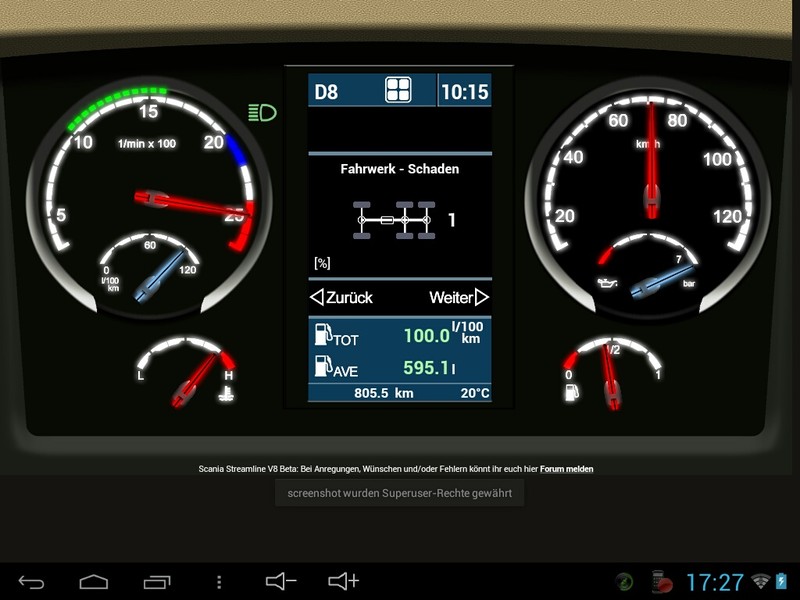
Scania Streamline V8 Dashboard
Name: Scania Streamline V8 Dasboard Skin
Description:
This is a Scania Streamline V8 Dashboard skin for the ETS2 Telemetry servers Funbit.
The important thing is not a mod overwrites the existing dashboards in ETS2. But it is only there to Telemetry data output from ETS2
To graph mitells the ETS2 Telemetry server of Funbit Exhtern (browser or Android app).
Hey People,
Today I finally managed to make it the new update and upload finished.
What has happened since the last version, because I finally through a youtube video I've found the way had to make me a more accurate picture of the dashboard.
I think I was able to install some nice things.
For this purpose it was necessary but the whole structure of the center window rebuild. But since this is now done, there are now 2 fields as in the originals Dashboard,
where you can select the Data itself. In the Upper progr. Field can be seen from the following displays No info, speed regulation,
Select differential lock, fuel consumption, engine operating hours and Adbluestand. In the Lower progr. Field you have the choice between the following displays
No information, tachograph information, brake pressure, fuel consumption, part streams. Information and Oil- / brake / water temperature.
Furthermore, the display switches from the skin from their accounts once the ignition. In addition, only the indicators of the parking brake and the hazard warning lights are displayed with the ignition off. Also newly added Dasboard the lighting is it can be controlled via the in-game lighting.
And finally, I also have integrated with the truck info. Here you can find all the relevant data with your truck.
The last menu item in truck Info is the inspection here please do not wonder, I calculate the time nor the KM data about the damage.
Side note for inspection in the config.json you can the inspection interval want to have their self-change,
procedure is followed as described in the Readme.txt only instead of the value from the "intelligent cruise control" to change simply "inspection" amends.
Here are a few pictures:
And here one more time said video if someone wants to compare: P
Features / Changes in beta v 0.4
revised breaks time display
integrated dashboardbeleuchtung
Truck info Display's involved (vehicle data, cabin / engine / gearbox / chassis / tire and total-loss advice, inspection)
Inspection: at the time I leave this value errechen still mittel's damage
Overall losses: It really is the total damage and do not like in the game where only the highest damage value is displayed
Settings menu included (currently field are progr only Upper or Lower. Integrated)
Display structure Completely redesigned so that oberen- / Lower can freely switchable displays work
Display responds to the ignition of the truck and Turns on or off
Source images purifies (now are only the most essential images in skin the rest is based on HTML)
the fuel pointer now works (but it does not work like the hand-game which is but the server itself)
So after I had now again found the leisure time I have a little further made at Scania Telemetry Skin
Features / Changes in beta v 0.3
New-> Display cruise control
New-> display intelligent cruise control *
New-> Display True mileage
New-> menu has been involved (truck information, Routadvisor, info, settings)
New-> Truck lightsBeaconOn, truck-lightsAuxRoofOnf and truck-lightsAuxFrontOn were bunde
Display intelligent cruise control * There are in Ordnerstrucktur a file named "config.json" this file can be found under "ETS2 Telemetry Server master \ server \ html \ skins \ Scania Streamliner V8 Dashboard \ config.json". This file can be found under "config" an entry "intelligent cruise control" here must here enter the value of your game settings. The value of intelligent cruise control takes her game under "Settings-> Gameplay> Intelligent Cruise Control".
Pictures
So look for long positions of the indicators finally a picture of the Scania found this graphic on a info shows because by now I could make the first version of Dasboads ready and make available for download.
Features / Changes in beta v 0.2
New-> tachometer as Tachograph
New-> speedometer as Tachograph
New-> Oildruck as Tachograph
New-> water temperature as Tachograph
Show New-> Tank as Tachograph
New-> Displays the currently engaged gear
New-> Time
New-> Indicators: Indicators Link / Right, hazard lights, parking brake, Retarder *, daytime running lights / low beam / high beam **
* Whatever the reason but to have the Scania Retarder in ETS2 do not seem: hmm: wherein the retarder indicator at Scania is not used
** As my Vorlge indicators unfortunately had only Fehr light and had no other headlights indicators I Tagfahrlich / low beam / high beam
Convention Ander lie and there is only a loving Frblichen Under Scheid.
Pictures
Credit:
- Skin Creator tino Thiel horn (Shakari)
- The re-upload the file is not allowed, only a link to oginaldatei is permitted
the truck may only be uploaded with the original DL link in other forums !!! The truck may only be uploaded with the original DL link on other site / forum !!!
As I said is just the beginning and trotdem I hope you like one or the other before.
Since I'm still also looking for all the ads there (warning as oildruck too high, tank empty and and and) it would be glad if someone has the opportunity could have come to me any pictures of the dashbord.
Comments12
You must be logged in to comment.
kannst du das auch für nen DAF XF Euro 6 machen
soviel schöne bilder aber bei mir wird zb nicht das scania zeichen angezeigt und auch nicht die rest km mit den der zeitigen tank volumen sowie wenn man 3achsen dran hat wird der tank inhalt nicht voll angezeigt sonder richtet sich nach den volumen des 2achser
wie rufts du denn den skin auf per Browser oder per android app
sorry aber das versteh ich nich so ganz also heißt das ich kann das nicht im singleplayer nutzen ?
Doch, natürlich kannst du. Der Skin ist jedoch nicht ingame eingebunden, sondern für den ETS2 Telemetry Server(einfach mal bei google suchen). Damit wird vereinfacht ausgedrückt das Kombiinstrument des Trucks auf einem zweiten Bildschirm, Laptop,Tablet usw. angezeigt. Ist spielend einfach einzurichten, wie das funktioniert, ist auf funbits Seite detailiert beschrieben. Der hier angebotene Skin wird dann in den Telemetry-Server eingebunden, wie das funktioniert, steht in der Readme, die im Download enthalten ist. Probier es einfach mal aus, ist eine richtig gute Sache und der Skin von shakari ist absolut genial.
Kann ich einfach die scs Datei in den Mod Ordner einfügen oder wie läuft das bei dem Mod ab?
es steht doch oben drinn das es kein mod für ets2 ist Wichtig es ist kein Mod der die vorhanden Dasboards im ETS2 überschreibt. Sondern er dient lediglich dazu um Telemetry-Daten die von ETS2 Ausgegeben werden Grafisch mitells des ETS2 Telemetry Servers von Funbit Exhtern (Browser oder Android App) darzustellen. dies ist ein Skin für denn Telemetry Server von Funbit da muss nix in nen mod ordner gepackt werden
Eine sehr schöne Sache. Könntest Du es auch für den Scania T machen?
möglich ist alles nur bin ich dabei auf die bilder der dashboards angewiesen wenn du also bilder von allen details hast (dashboard an sich, dashboard-icons, system display´s, systemwarnungen usw.) kann ich sowas gerne tun wie gesagt es liegt immer nur an den bildern denn ich kann mir ja nix aus den fingern saugen und ich möchte schon das bei so einem skin es so orginal wie möglich halten.