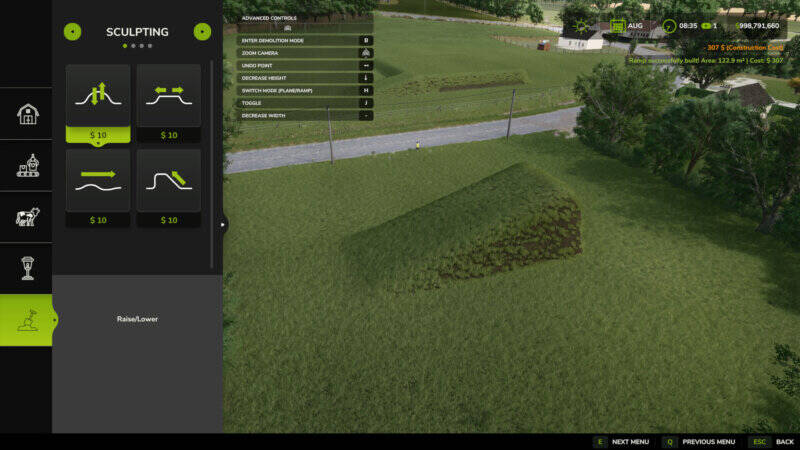
Auto Leveler - Terrain Leveler & Slopes
Tired of struggling with the default landscaping tool for hours? The Auto Leveler revolutionizes terraforming in Farming Simulator and lets you perfectly level areas for farms, building plots, and roads in seconds!
Simply mark the corner points of your target zone, preview the height plane in real time, and press [Enter] to flatten the entire area instantly with mathematical precision.
How to use:
Open the build menu and make sure you're on the main screen (without a selected building or active landscaping tool). Press [J] to activate the mod interface. If you're in an active submenu or tool, simply press [ESC] to return to the build menu's main screen, then activate the mod with [J].
Why use the Auto Leveler?
– Save countless hours: Create large building areas, farm expansions, and flat construction sites in seconds instead of fighting with the manual brush.
– 100% Flat & Level: No uneven hills, glitches, or holes under your sheds, silos, and factories.
– Smooth transition slopes: Say goodbye to jagged vertical terrain cuts with automatic edge blending (taludes) of 2m, 4m, or 6m.
– Perfect 3D ramp builder: Connect elevated farms and roads with precise gradient percentages and adjustable width.
– Financial control: Real-time area calculation (m²) and estimated cost preview before spending a single dollar.
Key features:
– 3D holographic plane with real-time height preview and volumetric pillars showing exact target height
– Auto 90°/45° alignment & square with smart magnetic snap point and neon green guide line
– Easy polygon closure by clicking on Point 1 or double-clicking anywhere
– Realistic slope smoothing (talude): vertical cut or gentle transition slopes (2m, 4m, 6m)
– 3D ramp builder with start and end heights, adjustable road width (2m to 30m), and real-time gradient calculation
– Dynamic height control: raise or lower the entire flat surface or individual ramp points instantly with arrow up/down keys
– Live financial & area metrics with real-time m² calculation
– Move & adjust points by pressing 'R' to drag and adjust marked points on the ground
Controls:
– [J]: Activate/deactivate Auto Leveler (in build menu)
– [H]: Switch mode (3D plane vs. 3D ramp)
– [X]: Toggle alignment (free draw vs. 90°/45° snap)
– [R]: Toggle action (add points vs. move points)
– [T]: Cycle edge finish (vertical cut, 2m slope, 4m slope, 6m slope)
– [Arrow Up] / [Arrow Down]: Increase/decrease height
– [+] / [-]: Increase/decrease ramp width
– [Left Click]: Place point on terrain / Click Point 1 to close polygon
– [Double Click]: Quickly lock and fix polygon points
– [Backspace] / [Right Click]: Undo last placed point
– [Enter]: Apply terraforming to terrain
Comments
You must be logged in to comment.
No comments yet.