Automatic Land Leveler
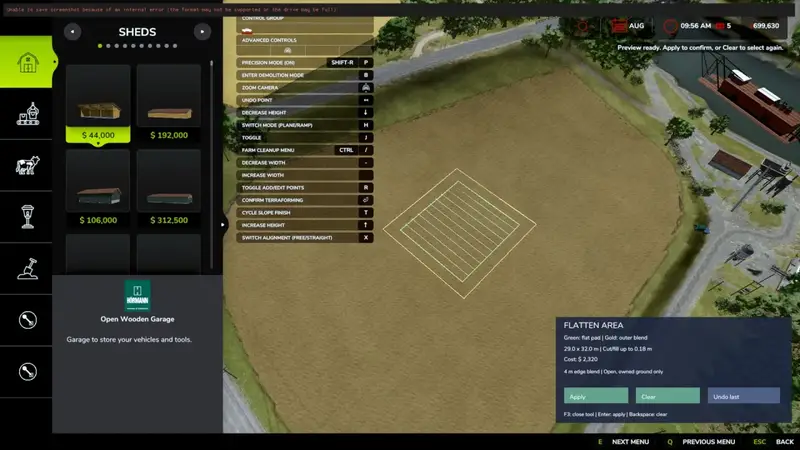
The Automatic Land Leveler prepares areas for your next farming project. This tool automatically flattens a selected area and uses smooth transitions to blend the modified ground into its surroundings.
Open build mode, select two opposite corner points with the left mouse button, and review the preview before confirming. The leveler automatically uses the lowest point within the selection as its target height. Higher ground is cut away while the edges blend smoothly into the surrounding terrain.
Features
- Rectangular selection using two corner points with a visual preview
- Automatic leveling to the lowest point within the selected area
- Maximum cut depth of 3 metres
- Selection sizes from 2 × 2 metres up to 1,000 × 1,000 metres
- Approximately 4-metre-wide transition zone around the selection
- Display of dimensions, maximum cut depth, and estimated costs
- Land ownership checks and obstacle detection based on the map's collision settings
- Undo function for the last operation, including a cost refund
- Progress display during terrain editing
- Existing crops and ground markings are preserved
Controls
- F3: Open or close the tool in build mode
- Left mouse button: Select two opposite corner points
- Enter / Apply: Review and confirm the operation
- Backspace / Reset: Clear the selection
- Undo: Undo the last operation and refund its cost
Cost: 2.50 in-game currency per square metre, with a minimum charge of 50.
Important information
- Designed for single-player on PC
- You must own both the selected terrain and the surrounding transition area
- The selection follows the map axes and cannot be rotated
- Keep the area clear of buildings, trees, vehicles, water, roads, and other obstacles
- Obstacles without collision data may not be detected on the map
- Only the most recent action can be undone; further terrain edits or newly placed obstacles may prevent undoing
- The undo history is cleared when you leave the savegame
- Wait for processing to finish before saving, leaving the game, or using other terrain tools
- Disable any separate auto-leveler tools while using this mod
Installation: Move the zipped mod file to Documents/My Games/FarmingSimulator2025/mods, then enable Flatten Area – Two Corners in the mod selection screen.
Credits: Wolffy
Comments
You must be logged in to comment.
No comments yet.