1 / 6
Virus checked
v0 latest
Free Mod
Australian Fencing Build Kit
–
Rating
0 Ratings
0
Downloads
44
Views
0
Thanks
Overview
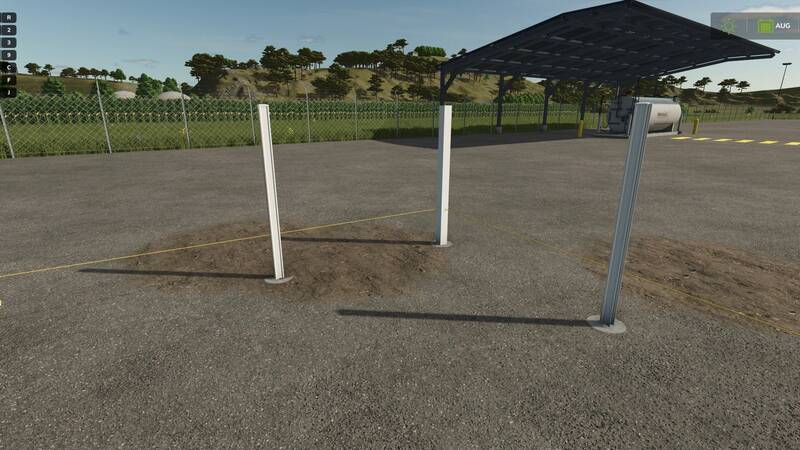
Build Australian Colorbond-style fencing directly on your map, from planning the line to placing the final components. Plan uniform 2.4-metre bays with reusable string lines, drill post holes, set the posts in concrete, and fit bottom rails, individual sheets, and top rails. Construction progress, materials, and concrete curing times are saved. Completed sections can also be dismantled manually.
Required mods and equipment
- Jamo Modding Tools: String-line reel, Concrete Bucket, Cordless Drill, Old Shovel, and Mixing Wheelbarrow
- Jamo Modding Pallets: Posts, sheets, combined rails, and cement
- An owned water tanker containing water
This mod is designed for single-player use. TerraFarm is not required. It uses the normal hand-tool controls, so your own key bindings may differ.
Building the fence
- Place the starter peg: Open Construction → JAMO MODS → Placeables and place a fence starter peg on your land.
- Plan the fence line: Approach the starter peg and press R. Walk to each desired corner or endpoint and press R again. Sections automatically snap into complete 2.4-metre bays. Press Ctrl + Enter to finish the planned line.
- Optionally attach a string line: Equip the purchased string-line reel and press R at a planned peg to attach the start. Walk to another peg and press R again. One reel supports one active span of up to 100 metres. Equip the same reel near either end and rewind it for reuse.
- Drill the holes: Approach each marked post position and press R when prompted. Stay beside the position until drilling is finished. The excavated material can be collected using a compatible loader or skid-steer bucket.
- Install the posts: Press R to take a post from its pallet, carry it to a drilled hole, and press R again to fit it.
- Mix the concrete: Take one cement bag from its pallet and place it in the empty wheelbarrow. Bring an owned water tanker containing at least 20 litres of water within three metres, then use the water prompt. Equip the Old Shovel and press R to mix the concrete.
- Concrete the posts: Equip the purchased Concrete Bucket and fill it at the wheelbarrow. Carry it to an installed post and press R to pour the concrete. Repeat as needed. One cement bag and 20 litres of water provide three hole-filling pours in this mod.
- Allow the concrete to cure: Curing takes 60 in-game minutes. You can continue working on other holes while you wait.
- Fit the bottom rail: Take a bottom rail from the combined rail pallet and install it between two cured posts.
- Install the individual sheets: Carry a sheet from its pallet to the bay, equip the purchased Cordless Drill, and press R to install it. Repeat for the remaining sheets. Every sheet in the fence project must be installed from the same side.
- Fit the top rail: Once all sheets in the bay are installed, collect and fit the top rail.
Controls
- R: Interact, take or return materials, start or stop work
- Ctrl + Enter: Finish the planned fence line
- Ctrl + Backspace: Undo the last planned corner
- Ctrl + Delete: Cancel the planning draft
- Ctrl + X: Toggle building or dismantling mode near a fence
- Ctrl + R: Take or return recovered materials near the original starting position
- E: Enter or exit the wheelbarrow
- W/A/S/D: Move and steer the wheelbarrow
- C: Change the vehicle camera
Helpful notes
- Stay on foot and close to the component while working.
- Carry one material item at a time. Return unwanted materials to their source pallet.
- Exit the wheelbarrow before loading, mixing, or filling the bucket.
- Finish planning before saving. Unfinished planning drafts are temporary.
- To dismantle a fence, enable dismantling mode and follow the prompts, starting with the top rail.
Comments
You must be logged in to comment.
No comments yet.