Classic, Modern & Arcade HUD Styles
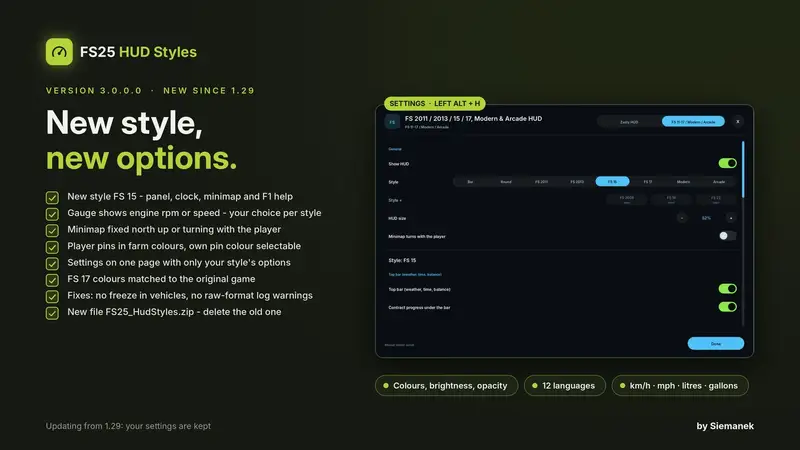
Modern & Arcade HUD adds six selectable user interfaces: four classic layouts from 2011, 2013, 2015 and 2017, plus the modern Modern and Arcade styles.
- Classic styles: faithful color schemes with bars, round tachometers, vehicle information, clock, contracts, minimap and tablet cards.
- Modern: a clean interface featuring selectable tachometer designs, vehicle schema, fuel, AdBlue and fill-level bars, along with several tablet appearances.
- Arcade: bold twin instruments, a large gear digit, gear-group badge, lighting effects and a compact racing-game look.
Every style can display speed, engine rpm, gear, cruise-control speed, fuel level, AdBlue, consumption, operating hours, selected implement fill levels, weather, time, balance, contract progress and a bale counter. The map supports either a fixed north-up view or a rotating display with coordinates, field numbers, building icons and multiplayer players.
Press Left Alt + H to open the settings window. Displays, colors, brightness and opacity can be adjusted for the selected style. Use 9 to switch between tablet or PDA cards, and [ and ] to change the map view.
The mod works standalone and can also be combined with Zasty HUD. It runs client-side and supports both singleplayer and multiplayer.
Installation: Place FS25_HudStyles.zip in your mods folder and restart the game. Remove any old FS25_ZastyHUD_FS2011.zip file so that the new version loads correctly.
Comments
You must be logged in to comment.
No comments yet.