1 / 2
–
Rating
0 Ratings
785
Downloads
16.0K
Views
0
Thanks
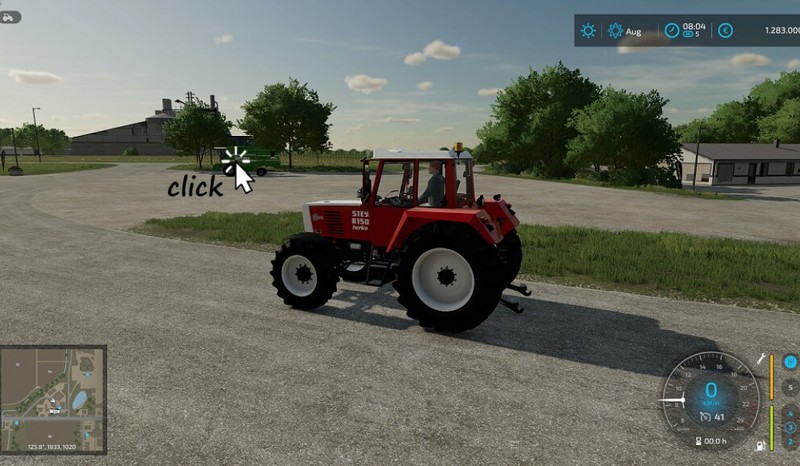
Simply click on the target vehicle with the mouse and enter it, instead of cycling through each vehicle.
For bugs and feedback, please visit https://github.com/Courseplay/ClickToSwitch .
Default keybindings:
Switching the mouse cursor on/off:
Right mouse click
Entering a vehicle:
Left mouse click
Changes between using the mouse cursor on/off keybinding and the alternative keybinding.
Right ctrl + C
Alternative keybinding for turning the mouse on/off:
Left ctrl + C
Changelog 1.0.0.1:
- Mouse cursor on/off alternative state is now saved (also for MP).
- Added compatibility for AutoDrive.
Changelog 1.0.0.2:
- Improved mouse handling with Courseplay and AutoDrive.
- Fixed bug to enable switching to a vehicle, while a helper is active.
Author
Comments1
You must be logged in to comment.
Hallo ! Sehr nützliches kleines Mod. Leider funktioniert dieses nach dem Update des LS22 auf Version 1.4.1.0 nicht mehr. Bin aber nicht sicher ob es wirklich durch das Update "deaktiviert" ist. Zeitlich würde es passen. Es steht in der Liste "installierte Mods" und ist auch aktiviert, im Spiel aber nicht verfügbar. Habt ihr da was in der Queue ? Gruß Lima