CVT Addon
This script introduces a real CVT, hydrostatic, or HST transmission to all vehicles with continuously variable transmissions.
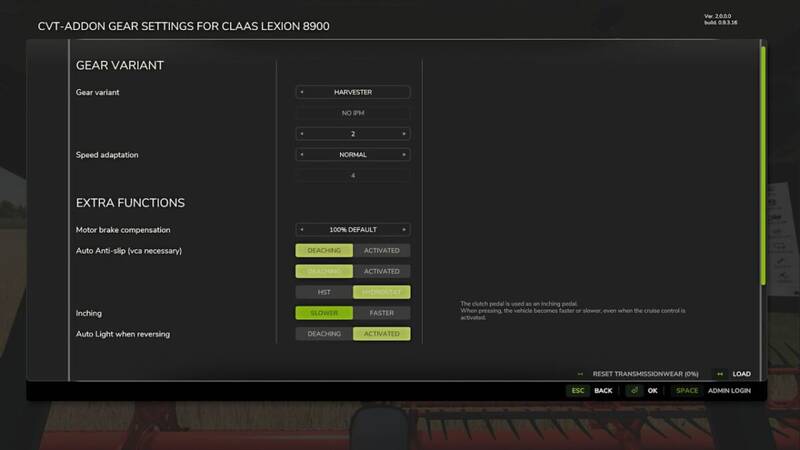
Configuration is done in the shop via a simple yes/no selection. If you select “Yes,” you can open a graphical user interface (GUI) in the game to select the desired transmission variants and additional functions.
- Automatic rear work light when reversing and afterglow duration.
- High beam/high beam flasher can be controlled via a dedicated button.
- Drivetrains completely redesigned.
- Percentage-based accelerator pedals for HST, hydrostatic, electric, and continuously variable transmissions.
- HST and hydrostatic now with 2 pedals – the clutch is used to shift to reverse.
- Engine preheating depends on the outside temperature – the colder it is, the longer the preheating time. Compatible with the Giants ignition switch – only works when the ignition is on.
- Engine start depends on temperature – influenced by the environment or weather.
- New harvester configuration with optimized handling for field and road modes. In field mode, you can use the clutch pedal as an inching function.
Important:
- The buttons for the CVT-Addon must first be assigned, as it can be set up for many setup variations. The GUI is preset with [lShift + lAlt + C]. And the switch for the automatic taillight is on [lShift + lAlt + A].
- All settings in the game should be set to manual. Manual gearshift and clutch. No automatic controls should be active.
- If you want to drive realistically, you’re already doing that. The CVT add-on should be actively played and not just a “running in the background” mod. (Adapt for the respective application)
- The vehicle XML value “rotInertia” (flywheel) must not be specified or must be precisely adjusted. And remember: the engines must warm up first. If in doubt, please watch the tutorials.
Setting options:
General CVT:
- 0 to 5 acceleration ramps can be set.
- Braking ramps can also be set.
- TMS pedal mode can be deactivated.
- Automatic differential lock can be activated or preselected. (FS25_VehicleControlAddon or FS25_EnhancedVehicle required)
- Efficient operation of the machine at maximum performance.
- The clutch must be engaged to start the engine.
Classic CVT:
- Number of drive ranges can be configured.
- Drive ranges are shifted manually.
Modern CVT:
- Two drive ranges shift automatically – you hardly notice it.
- The parking brake is activated as soon as you leave the driver’s seat. (FS25_VehicleControlAddon or FS25_EnhancedVehicle required)
- Low-speed concept for efficient operation.
- Convenient operation thanks to fewer settings required.
- Pull-in turn possible.
Hydrostatic and HST drive:
- Two basic variants can be selected via the GUI.
- In this configuration, acceleration ramps are used as speed steps.
- Both drives use a percentage-based accelerator pedal.
- With the hydrostatic drive (older version): Hand throttle required for A. Top speed B. Increased pump power (e.g., for front loaders)
- The newer version regulates many things automatically, but hand throttle remains helpful.
- If FS25_VehicleControlAddon is active: Parking brake must be applied to start the engine.
Heat, overheating, and wear:
- Engines must warm up, otherwise increased wear occurs.
- Improper use/incorrect adjustment can cause transmission damage.
- High oil pressure can trigger overheating and wear.
- Engine temperatures are only synchronized with FS25_DashboardLive in multiplayer. (DBL must be active)
Influence on functions and influencing factors:
Engine braking effect:
- Dynamically calculated based on:
- Weight, speed, wind, Incline, decline, engine speed, power, ramp selection, etc.
Starting the engine:
- Continuously variable: Clutch must be depressed.
- Hydrostatic: Parking brake active (with VCA), Hand throttle to 0
Drive ranges:
- Two standard ranges (I / II), expandable for classic mode.
- Level II: Road, light work
- Level I: Field work, heavy load
- Torque and maximum speed adjusted
- Key assignment per level or switchable possible.
- Only change when stationary (to avoid damage)
- Modern configuration: automatic control
Acceleration ramps:
- 0 to 5 levels
- Influence acceleration and deceleration
- High pressure for heavy equipment – at high ramps
- Ramps 4–5 are more suitable for empty runs
- For light field work: ramp selection depends on the equipment
Further detailed explanations and tutorials: in the Wiki on GitHub.
Virtually all values/settings are available and usable with FS25_DashboardLive. Likewise, telemetry output for telemetry from Upsidedown. e.g., automatic work lights currently active. Further information in the Wiki.
Version 2.1:
- Glow plug notification was visible to all clients.
- Fixed HST sync error in multiplayer.
- HST/hydrostat can now change direction via keybind, which some real-life vehicles have.
- Requirement to press clutch for starting is now configurable.
- Removed EV support due to multiplayer incompatibilities.
- Added differential keybindings for VCA.
- Added DLC vehicles to the shop.
- Separate keybinding for pipe light.
- Keybinding to manually switch between top and bottom lights.
- Shop config is enabled by default but configuration remains inactive, allowing mission vehicles to be set.
- Added keybindings for shifting driving ranges up and down.
- Added PT and ES community translations.
- Fixed issue where manual vehicle engines stalled immediately after preheating.
- Engine heats up or cools down while outside the vehicle when used with FS25_DashboardLive.
- Expanded and optimized DBL telemetry output.
Comments
You must be logged in to comment.
No comments yet.