1 / 6
Virus checked
v0 latest
Free Mod
DTM Screenshot Studio – Automated Mod Screenshots
–
Rating
0 Ratings
3
Downloads
254
Views
0
Thanks
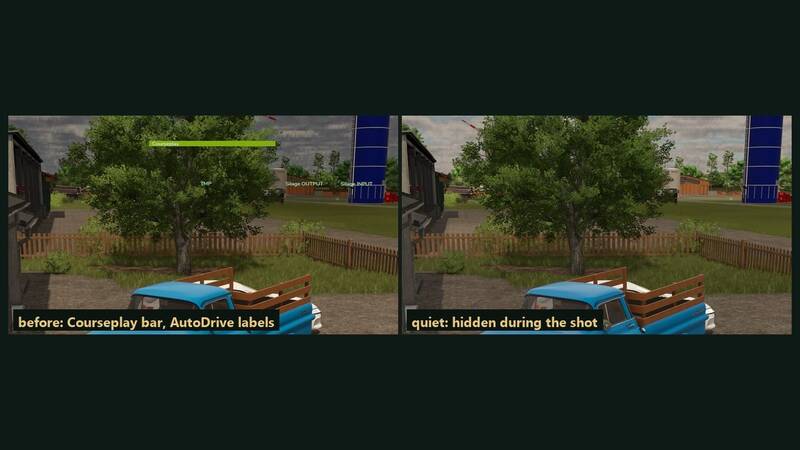
Create polished mod screenshots with ease: Position your vehicle or building in a good-looking spot and press a key. Get clean images without the HUD in 1920 × 1080, where the game supports that resolution.
- Right Ctrl + 1: Takes a clean shot of the current view without the HUD.
- Right Ctrl + 2 – Orbit: Creates 12 framed shots from all around the vehicle you are sitting in, including attached equipment, or the nearest building.
- Right Ctrl + 3 – UI shot: Waits five seconds so you can open a menu, then saves the screen with that menu.
- Right Ctrl + 4 – Lighting: Switches between golden hour, morning mist, midday sun and overcast conditions. Press again to restore the original lighting.
- Right Ctrl + 5 – Burst: Captures a clean shot every three seconds for one minute while you continue working.
- Right Ctrl + 6 – Colors: Shows the same view in every shop color without changing the vehicle itself.
Walls, poles and tree crowns in the way are automatically avoided. On-screen overlays from other mods are hidden while taking the shots.
Controls: You can change the key combinations under Options > Controls. Pictures are saved to modSettings/FS25_ScreenshotStudio/<mod name>/.
Console commands ssClick, ssTab and ssType allow you to press buttons, switch tabs and type into menus. ssView can also take framed shots from further away. Available in single player only.
Created by DTM Mods (Fennell). Support and bug reports: Discord.
Comments
You must be logged in to comment.
No comments yet.