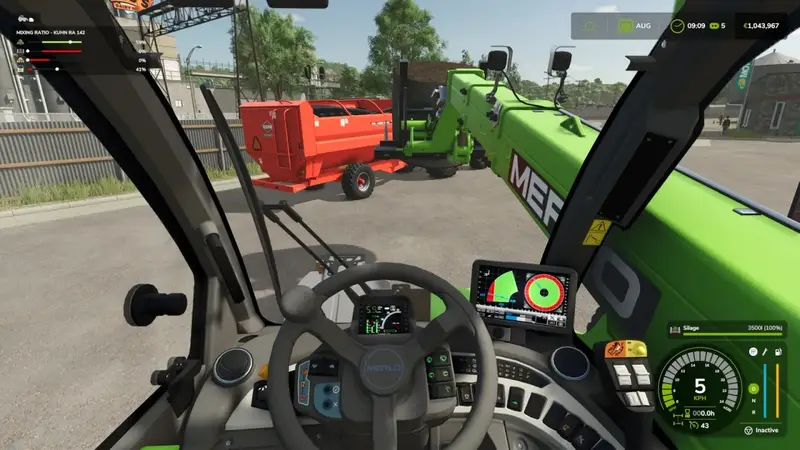
Feed Mixer HUD
The Feed Mixer HUD displays all feed mixers within a 12 m radius in a compact window in the upper-left corner of the screen. It works on foot and from inside any vehicle, allowing you to monitor feed mixtures even while loading with a telehandler or wheel loader.
Each ingredient in the feed recipe is shown with:
- the ingredient icon,
- a bar indicating the recipe's target range,
- a marker for the current proportion,
- the current percentage.
The target range turns green when the current proportion is within the recipe limits. It turns red if the amount is too high, too low, or the ingredient is missing. This lets you quickly see what still needs to be added or what has been overfilled.
Unlike the built-in mixing ratio display in the F1 help window, the Feed Mixer HUD remains functional when the F1 help is hidden and lists multiple nearby mixers one below another. It never covers the help window itself.
Important information:
- The window appears only while the F1 help is hidden. The F1 help window continues to provide its own mixing ratio display for the mixer you are currently using.
- The window is not visible when menus are open or the game HUD is hidden.
- It works with all mixers that use the game's mixer function, including compatible mods.
- The window size follows the UI scaling setting.
- This mod is display-only and does not affect gameplay or save data. It is multiplayer compatible.
No keyboard shortcuts are required. The display appears automatically while the F1 help is hidden.
Comments
You must be logged in to comment.
No comments yet.