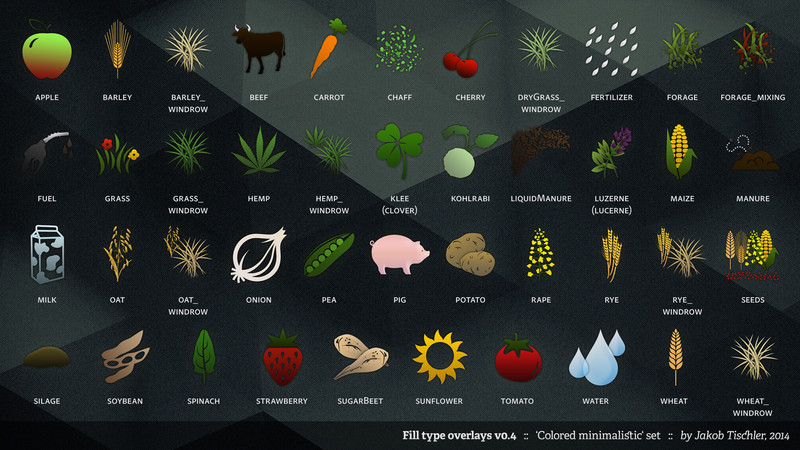

This script adds standardized overlays (hud icons) for a group of fill types. Two different sets are included:
- The 'Giants' set has been matched to Giants' default fill type overlay style. It includes 28 icons:
- apfel/apple
- beef
- carrot
- cherry
- fertilizer
- fuel
- hemp
- hemp_windrow
- klee [clover]
- kohlrabi
- liquidManure
- luzerne [lucerne]
- manure
- milk
- oat
- oat_windrow
- onion
- pea
- pig
- rye
- rye_windrow
- seeds
- soybean
- spinach
- strawberry
- sunflower
- tomato
- water
- The 'colored minimalistic' set is, well, colored, and also minimalistic, and somewhat sexy. It includes 43 icons:
- apfel/apple
- barley
- barley_windrow
- beef
- carrot
- chaff
- cherry
- dryGrass_windrow
- fertilizer
- forage
- forage_mixing
- fuel
- grass
- grass_windrow
- hemp
- hemp_windrow
- klee [clover]
- kohlrabi
- liquidManure
- luzerne [lucerne]
- maize
- manure
- milk
- oat
- oat_windrow
- onion
- pea
- pig
- potato
- rape
- rye
- rye_windrow
- seeds
- silage
- soybean
- spinach
- strawberry
- sugarBeet
- sunflower
- tomato
- water
- wheat
- wheat_windrow
Please note that this script does not add the fruits to your map. It simply 'installs' the hud icons for existing fruit/fill types. Existing overlays will be overwritten.
Installation
Simply copy the fillTypeOverlays.zip archive into your mods folder. The first time a map is loaded, a new xml file called fillTypeOverlays.xml will be created in your profile folder. You can then activate the set you want to choose, and deactivate the other one(s). To do that, set the attribute "active" to "true" for the wanted set, and to "false" for the unwanted set(s).
Preview
'Giants' set (click for original size)

'colored minimalistic' set (click for original size)

Adding additional icons
You can easily add your own icons. Create the icon (256px x 256px, DXT5 transparent DDS, no mip-maps), name it exactly as the fillType's ingame name - i.e. liquid manure must be named "liquidManure.dds", and not "liquid_manure.dds", "liquidmanure.dds" or "slurry.dds". Copy the image file to the mod's corresponding set folder. The overlay file will be 'installed' automatically during the loading of the map.
Copyright
No modification without the author's written permission. No re-upload by anyone but the original author. No commercial usage.
Copyright © Jakob Tischler, 2014
For additional attributions concerning the icons, see the Readme.txt file.
Comments44
You must be logged in to comment.
Funktioniert das auch im LS15?
These looks really nice :) Just a question though, since there`s so many new fruits now, how about a new version that contains: Kalk, apple (apfelmod), orange and red cabbage ?
Sorry, didn`t notice apple was already there, change it with woodchips to mye list then :D
Ich habe für Kalk ein Fehler: fillType overlay "kalk.dds" loaded for fillType "kalk" ("Missing kalkSolid in l10n_de.xml") wie kann ich das ändern?
Eins der besten addons ! Funktioniert auch super mit dem MIG Map, welches ja zusätzliche Fruchtsorten per Overall Addon in jegliche Standard-& Modfahrzeuge integriert! Super Arbeit! Vielen Dank
sehr schöne arbeit danke für das script 5von 5 sternen
Aufrund des Kalk-Mods: Kalk wäre super! Gruss vialis
Sollte es nicht zu viel Aufwand sein, wäre ich um Gurken froh. Schon mal Danke
Eine feine Idee, Hatte nur das Problem dass es bei mir nicht gleich gelaufen ist. Nach längeren Herumtesten hatte ich die Galucho Trailers von euroDZN (http://www.modhoster.de/mods/galucho-trailers) identifiziert. Dieses Pack beinhaltet ein Skript zur Fruchtregistrierung, warum auch immer, und das sperrt sich dann wahrscheinlich! Sieht also so aus dass Fahrzeuge/Geräte mit eigener Fruchtregistrierung, zu welchen Zweck auch, sich mit diesen Mod beißt. Aber bitte, das ist jetzt eine reine Vermutung von mir und keine technisch fundierte Feststellung! Ich will auch gleich klarstellen dass ich das Galucho Trailerpack gerne verwende, nicht dass jetzt Jemand denkt dass ich es schlecht machen will, es verträgt sich halt im Moment mit der Version 0.3 dieses Mods leider nicht. MfG Tom
Danke für die Info, ist in der nächsten Version gefixt.
Wie wäres mit Klee und Luzerne als zusätzliche Overlays?
kommt sudangras auch noch?
Nein, wird nicht kommen.
So her a pic from me, so guess fertilizer symbol works and no errors, thx for this mod and like it very much. thx for sharing your work and nice day br joe dk
schöner mod und super Idee mir gefällt das so besser wenn alles einheitlich gestaltet ist. PS: die beschreibung einfach genial XD "water = (Billigvodka)" MFG Topbauer
Mit V0.3 lädt das Spiel korrekt - und die Fill Type Symbole werden auch ersetzt. Ich habe aber ebenso wie LPG_Rübensaft das Problem, dass für Sonderfrüchte (Apfel und Kirsche) nun gar keine Symbole mehr angezeigt werden. Meine Vermutung: Für diese beiden Früchte sind andere Fill-Type-Namen definiert worden, keine standardmäßigen. Werd's jetzt also probieren, die richtigen Namen rauszufinden und sie von Hand einzubauen.
Das wundert mich ein wenig. Es kann gut sein dass die fillType-Namen nicht übereinstimmen. Aber dann sollten die "Original"-overlays eigentlich auch nicht ersetzt werden, da sie ja mit nichts ersetzt werden können. Setze mal bitte in Zeile 19 "self.debugActive" auf "true", starte die Map, und poste dann mal die Log.
Fehler gefunden: Ich hatte die Multifruitmap Kernstadt drin. Die hat eigene Icons für Früchte. Daher der Fehler.