Forestry AI – Automated Logging Crew
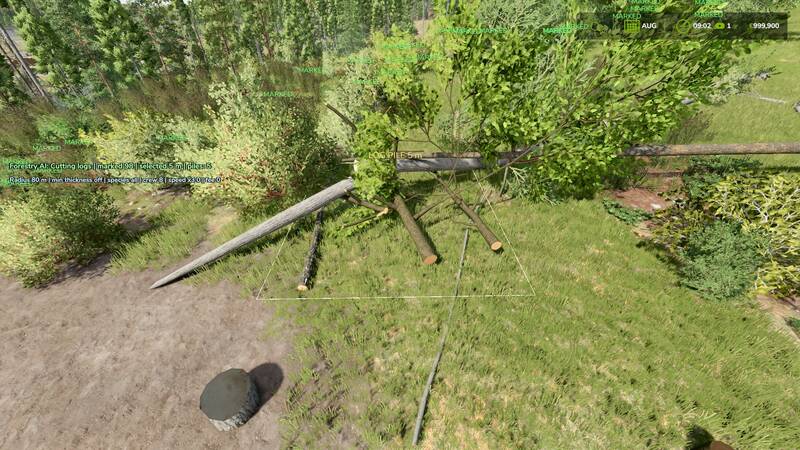
Forestry AI is an AI logging crew for Farming Simulator. Mark trees, place the desired log piles, and start the workers with a single keypress. The crew fells every marked tree, removes all branches, cuts the logs to your chosen length, and stacks them in the correct piles.
- Tree marking: Mark trees individually with the spray can, look at a tree, or select every tree within an adjustable radius.
- Fully automated work: Up to eight workers process the trees in batches, complete with chainsaw and tree-falling sounds.
- Sorted log piles: A separate pile can be created for each desired log length. Every log is automatically placed in the correct pile.
- Flexible filters: Set a minimum trunk thickness and filter by tree species. The selectable work radius ranges from 15 to 80 metres.
- Stump removal: Marked stumps can be removed within a chosen radius.
- Your land only: The crew only works on land that you own.
- Clear on-screen display: Ground frames identify the log piles, while status information and settings are shown directly on screen.
- Final report: Once the work is complete, the total number of felled trees and the log count for each length are summarised.
- Optional fee: A configurable fee can be charged for every felled tree.
- Multiplayer: The mod is fully supported in multiplayer sessions.
How it works: Mark your trees, select the log length with Alt+L, and assign a matching pile with Alt+O. Press Alt+K to start or stop the crew.
Default controls (all keys can be changed):
Tree selection: Spray can, Alt+T to mark or unmark the tree you are looking at, Alt+M to mark all trees in the radius, Alt+V to unmark trees in the radius, and Alt+N to unmark every tree.
Log piles: Alt+O to set the pile for the selected length, Alt+U to remove the nearest pile, and Alt+L for the log length (3, 4, 5, 6, 8, or 10 m).
Work settings: Alt+K to start or stop the crew, Alt+R for the radius, Alt+F for the minimum trunk thickness, Alt+E for the species filter, Alt+C for the crew size, and Alt+S for the animation speed.
Stumps: Ctrl+Alt+Z marks all stumps in the radius, while Ctrl+Alt+K removes the marked stumps.
Translations are available in English, German, French, and Romanian. Bugs and feedback can be reported through Discord.
Comments
You must be logged in to comment.
No comments yet.