1 / 3
Virus checked
v1.0 latest
Free Mod
GE Script - Extended FieldToolkit
–
Rating
0 Ratings
436
Downloads
8.9K
Views
0
Thanks
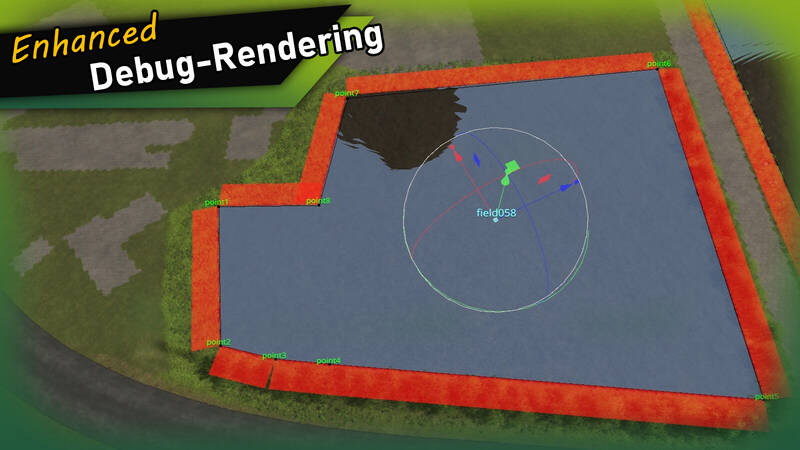
The Extended FieldToolkit enhances the standard GIANTS FieldToolkit with a plethora of new features and an improved debug view, streamlining the process of creating and managing fields.
Features:
- Create or edit fields entirely through the UI.
- Create and manage land parcels (e.g., farms, forests, lakes).
Debug View:
- Field names are rendered in the 3D viewport at each field's pivot position.
- Polygon points and names are shown for the selected field.
- Duplicate polygon vertices are highlighted.
Tools:
- Validate Fields: Checks all fields for misconfiguration, InfoLayer overlaps, and missing attributes – with a clear [OK] / [WARNING] / [ERROR] output.
- Adjust Field Pivots: Moves each field's TransformGroup pivot to the area centroid of its polygon (correct even for concave fields).
- Set Foliage from fields.xml: Paints the fruits defined in fields.xml directly onto the fields.
- Repaint Fields: Repaints all fields into the farmlands InfoLayer.
- Clear Fields: Removes all fields from the farmlands InfoLayer.
- Clear Foliage: Removes foliage from fields, with an optional configurable edge offset.
- Paint Field Edges: Paints a chosen terrain texture along field borders, optionally inwards as well.
- Rename Fields: Renames all fields with a consistent 3-digit numbering.
- Align Polygon Points: Aligns all polygon points to the terrain height.
- Field statistics (total area, field count) are displayed at the top of the window.
Info:
On first launch, the tool automatically adds the userAttribute “farmlandID” to all fields that don't already have it. This attribute is used to determine farmland ownership and replaces the name-based approach used by the standard FieldToolkit.
Installation:
- Navigate to the GIANTS Editor AppData path. Default: “C:\Users\[USER]\AppData\Local\GIANTS Editor 64bit 10.0.XX\scripts\”.
- Copy the file “FieldToolkitExt.lua” from the prefab into the scripts folder.
- The script will then be available in the GIANTS Editor via the menu bar under “Scripts”.
Comments
You must be logged in to comment.
No comments yet.