1 / 2
Virus checked
v1.1.1 latest
Free Mod
GE10 Script - Spline Toolkit
–
Rating
0 Ratings
488
Downloads
10.0K
Views
0
Thanks
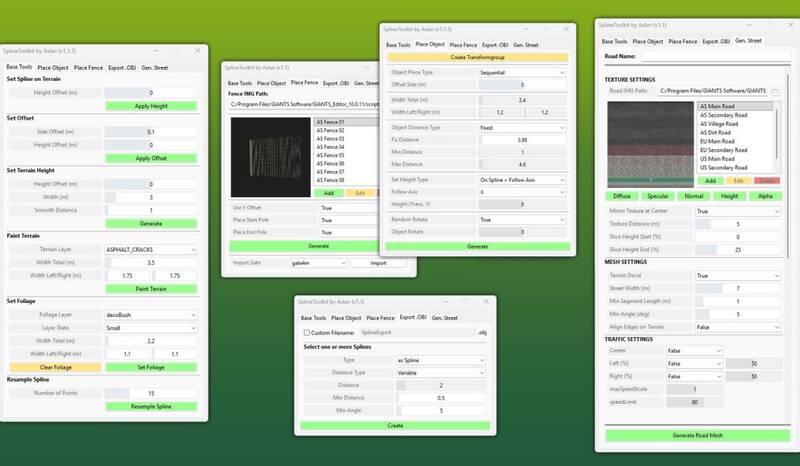
The Spline Toolkit is a powerful script for the GIANTS Editor, offering a comprehensive set of tools for spline manipulation. It simplifies tasks such as terrain editing, object and fence placement, and exporting splines to .OBJ files for Blender. Additionally, it facilitates road mesh generation, all within a single tool.
Feature Overview:
-
Base Tools:
- Set Spline on Terrain: Projects spline points directly onto the terrain with optional height adjustments.
- Set Offset: Applies vertical and horizontal offsets to a spline.
- Set Terrain Height: Matches terrain height to spline height with precision controls.
- Paint Terrain: Easily paint terrain along a spline using various layers.
- Set Foliage: Places foliage along the spline.
- Resample Spline: Adjusts the number of control points on a spline.
- Place Objects: Precisely place objects along a spline with adjustable parameters.
- Place Fence: Create complete fence systems efficiently using base game fences with preview images.
- Export as .OBJ: Export splines to .OBJ files for Blender with additional parameters.
- Generate Street: Quickly generate roads using base game textures, complete with correct UVs for further editing in Blender.
Installation:
- Navigate to the GIANTS Editor installation directory (Default: "C:\Program Files\GIANTS Software\GIANTS_Editor_10.X.X\").
- Copy "SplineToolkit.lua" and "imgFence"/"imgRoads" from the prefab into the Script folder of the GIANTS Editor.
- Access the script via the GIANTS Editor menu under “Scripts”.
Comments
You must be logged in to comment.
No comments yet.