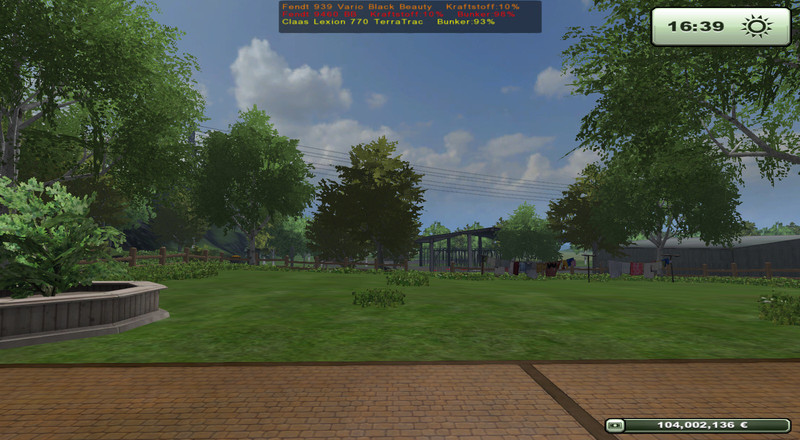
Global warning indicator Global warning display
Global warning | Global Warning Display | GWA
************************************************** ********
NOTE :
This mod installs itself into all motorized vehicles , Drescher,
Sowing and fertilizer application independently.
NOTE :
This mod with any of the Hagenstedt Modified 2013 use , there
he is already integrated !
How are you the AI helpers on field 1 at harvest ? Does he have enough fuel in the tank ? If the bunker maybe full? And what does the tank from the tractor to the dug bert on box 35 ? Where the diesel or for the rest of the field ?
If you are confronted with such questions then it is time for the GWA . Here we obtain the necessary information to be able to react in time , without which one must sit yourself in one of the vehicles .
================================================== =========
Use of the mods in the game
================================================== =========
Each device can be individually excluded from the global warning indication to the device must be coupled (if it is not self- mobile) and it must also be selected . Then a shutdown via the key combination Ctrl + Left D ( Standardbelegeung , can be changed in the options ) is possible , of course it can it be turned on the very same way again so that it is displayed again if the device is empty or full.
What can be switched off ?
Useful for example if a shuttle trailer also has the ability deploy itself ( manure, water , etc), then in this trailer By default, the level is displayed as a warning if it is too low. But he should act purely as a feeder , this is not necessary and can therefore be turned off.
The status, so whether on or off is stored with the vehicle / equipment in the savegame !
================================================== =========
Features at a glance
================================================== =========
Display when the fuel level of a vehicle under 15 % falls
Display when the bunker of a thresher / a harvesting machine exceeds the 90 % mark
Combined display at threshers / Harvesters if tank <15% and bunkers content > 90%
Display at sowing machines when the level falls below 10%
Display in fertilizer spreaders when the tank level drops below 15 %
The display can be divided into several stages Hide the F1 key , the sequence looks like this :
Help window visible , Hud visible
Help window is not visible , Hud visible
Help window visible , Hud NOT visible
Help window NOT visible Hud NOT visible
again everything visible , starting from the front
Comments16
You must be logged in to comment.
Geiler Script :) Gute Info, sehr gut plaziert und lesbar. DANKE
Hallo, kann es sein das sobald ich die Global Warnings im Mod Ordner habe die Helfer Saatsgut und Dünger verbrauchen. Vorher haben Sie das nicht getan. Gruß Tonton1969
Sehr guter Mod und sehr hilfreich. Habe aber auch dieses Problem? Kann mir da einer helfen??? Danke Jedoch steht bei mir im Hilfefenster: Tasten STRG LINKS D missing disableWarnings in l10n_de.xml Sowohl im MP als auch SP
Du musst die "ZZZ_AccidentWarnings.zip" öfnnen. Dort findest du die "WarningsFunction.lua"-Datei. Diese kannst du z.B. mit Notepad öffnen. Dort suchst du dir folgenden Abschnitt: g_currentMission.extraHudMode = 0; g_i18n.globalI18N.texts["diesel"] = g_i18n:getText("diesel"); g_i18n.globalI18N.texts["grain"] = g_i18n:getText("grain"); g_i18n.globalI18N.texts["seed"] = g_i18n:getText("seed"); g_i18n.globalI18N.texts["oilWarning"] = g_i18n:getText("oilWarning"); g_i18n.globalI18N.texts["fert"] = g_i18n:getText("fert"); und fügst das hinzu: g_i18n.globalI18N.texts["disableWarnings"] = g_i18n:getText("disableWarnings"); Söllte dann insgesamt so aussehen: g_currentMission.extraHudMode = 0; g_i18n.globalI18N.texts["diesel"] = g_i18n:getText("diesel"); g_i18n.globalI18N.texts["grain"] = g_i18n:getText("grain"); g_i18n.globalI18N.texts["seed"] = g_i18n:getText("seed"); g_i18n.globalI18N.texts["oilWarning"] = g_i18n:getText("oilWarning"); g_i18n.globalI18N.texts["fert"] = g_i18n:getText("fert"); g_i18n.globalI18N.texts["disableWarnings"] = g_i18n:getText("disableWarnings"); Jetzt speicherst du die "WarningsFunction.lua". Das wars. MfG
Gefält mir ebenfalls serhr gut. Jedoch steht bei mir im Hilfefenster: Tasten STRG LINKS D missing disableWarnings in l10n_de.xml Sowohl im MP als auch SP
Fehler gefunden: in der WarningsFunction.lua fehlt die Zuweisung g_i18n.globalI18N.texts["disableWarnings"] = g_i18n:getText("disableWarnings");
War in letzter Zeit mit Inspector immer unzufriedener, hab's ständig ausgeblendet, aber dann doch wieder eingeblendet, um nachzuschauen, dann wieder ausgeblendet. Da ist deine Sache hochwillkommen. Die meldet sich von alleine, und die Position oben in der Mitte ist auf jeden Fall auch besser als die vom Inspector.
Genau die Menge an Infos die ich wirklich brauche (und Platz auf dem Bildschirm den ich bereit bin dafür zu opfern). Super :) Inspector&Co waren mir immer viel zu viel Information, zu wenig gefiltert, auf viel zu viel Platz verteilt. Das hier darf bleiben :) Danke! :)
Gibt es ne Möglichkeit, die Werte zu ändern? Damit z.B. der Drescher bereits bei 10% Füllstand angezeigt wird.
In der AccidentWarnings.lua wird für jeden Ausgabetyp (Combine, Fertilizer etc. ) ein 'local tmp' Wert berechnet, der den aktuellen Füllstand in Prozent angibt. 'local tmp = math.floor' gefolgt von einer Formel Dann folgt eine Zeile mit 'if tmp < 20' oder 'if tmp >80' etc. Meine Vermutung ist, dass in 'tmp' die Grenzwerte gesetzt werden, ab denen die Warnung getriggert wird. Probier mal diese 'if tmp' Werte zu verändern, vielleicht hilft dir das ja beim Anpassen der Triggerwerte für die Warnungen.
Auch wieder etwas, was ich von der HM schon kenne, Schätzen und zu Lieben gelernt habe. Bewertung 5 Sterne ;)
Hm, das gibt es doch schon alles als Mod ... ZZZ_Inspector_V21
inspector beist ich mittlerweile mit einigen mods. loadstatus ist links und lässt sich nur komplett ausblenden/einblenden. also ist dieses tool mittig oben mit den fähigkeiten wirklich ne gute erneuerung.
Ich möchte deine Arbeit nicht schlecht machen, aber dafür nutze ich den "loadstatus"-Mod. Da habe ich nämlich immer alles im Blick. Ausserdem kann ich die Anzeige mit einer seperaten Taste aus- bzw einblenden. Geschmackssache... Dafür habe ich mir deinen Kraftstoffverbrauch-Script runtergeladen. Danke schön.