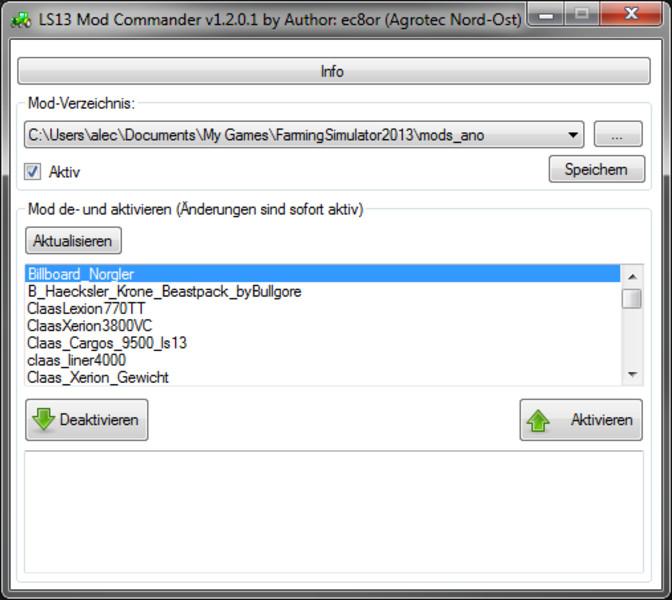
LS13 ModCommander
Edit 21.09.2013:
LS11 Support ModCommander 1.4:
http://www.modhoster.de/mods/modcommander
Hello,
I've got something that others could possibly use.
Why have I developed this tool
I've been playing for some time in an agricultural company in multiplayer. Here we have some like all other mods. However, in single player I use other, partially incompatible mods. Since I run games and it has always been very fiddly when all the mods were in a directory, because I always had durchegehn ingame then the whole list to select the right or the mods manually back and forth so I had to push ingame then click "Select All could "press. Around here the possibility to create easy to switch between the packages originated this tool.
How do I use it (and you could do it too)
I have the LS13 directory (... \ Documents \ My Games \ FarmingSimulator2013 \) Verzichnisse for more mods. Mitdem program, I can now change the directory from which the LS Mods einließt:
To choose in the gate "mod directory" the path from ("..." button) and set the hook when active. Then I click on "Save" and the changes are active. The program remembers all the paths so that I can later move faster. If I want to go back to the default settings, I just take the hook out and save with active, then the mods again "mods" is read from the directory.
Also, I kanns einzele enable and disable mods and with information on the mod can show (see pictures).
Notes
I make no claim to completeness or correctness of this program. You use it at your own risk.
Credits (things you used but did not develop yourself):
Wheeled Tractor icon: http://www.aha-soft.com/stock-icons/transport-icons.htm
Tango Icon Library http://tango.freedesktop.org/Tango_Icon_Library
DevIL: http://openil.sourceforge.net
# ziplib: http://www.icsharpcode.net/opensource/sharpziplib/
Comments27
You must be logged in to comment.
kann man den auch während dem spielen nutzen? also in einem game? ansonsten könnte man ja auch einfach wie du es gemacht hast mehrere ordner mit mods machen und die einfach umbenennen da dass spiel ja NUR den mods ordner abfragt... wenn da aber z.b ne 1 oder sowas hinter mods steht beachtet dass spiel den ordner nich mehr
Danke für insgesamt über 4300 Downloads :) Bitte laded das aktuelle Release herunter: LS13 ModCommander 1.3.2.0 http://www.modhoster.de/mods/ls13-modcommander--5 Andre von Modhoster hat gesagt, das das Programm auch mit LS 2011 einwandfrei funktioniert.
Deine Beschreibung ist schon recht ausführlich, hilft mir aber trotzdem nicht ganz um deinen Commander funktionsfähig zu bekommen. Wenn ich den starte fragt er mich nach der gamesettings.xml. Wo liegt den die im Spielordner, habe ich nirgends gefunden.
c:\Users\%USERNAME%\Documents\My Games\FarmingSimulator2013 da braucht ec8or nicht immer antworten =) SUPER "MOD"
Geil, richtig nützlich !!
For this, i created a folder "Mods-multi" and "Mods-solo". In the "Mods-solo" i placed all my mods, and in the "Mods-multi" i placed the mods for my multiplayer party". So i have to rename the good folder in "Mods" before running the game.
also ich habe alle dateien wie normal auch im mods ordner und durch das program kann ich sie an oder aus schalten hab auch was gebraucht bis da hinter kam ;) geile sache
Super Mod weiter so danke.
programmidee: super umsetzung: super bugs: unbehandelte fehlermeldungen wenn z.b. ein pfad nicht gefunden werden konnte. vorschläge: es sollte irgendwo stehen, dass man das mod-info-fenster durch doppelklick auf einen mod bekommt. beim hinzufügen von neuen pfaden "..." sollte die auswahl beim aktuellen ordner starten und nicht "draußen, bei den laufwerken". die sichtbare modliste sollte länger und/oder vergrößerbar sein. in diesem sinne - danke für den ModCommander :)
Kannst du mir den genauen Fehler nennen? Also bei einer unbehandelten Exception müsste dir ja ein Stacktrace angezeigt werden. Wäre schön wenn du mir den zukommen lassen könntest. Was meinste du mit "Aktuelles Verzeichnis"? Das aktuell gewählte? Das macht für mich nicht unbedingt Sinn. Alternativen: Start bei zuletzt über "..." gewählten Verzeichnis oder start im LS-Verzeichnis (c:\Users\%USERNAME%\Documents\My Games\FarmingSimulator2013\) Welche würdest du da präferieren? Vergrößerbare listen: Jo geb ich dir recht.
Meine Beschreibung scheint ja leider nicht deutlich genug zu sein für einige. Deshalb zitiere ich an dieser Stell nochmal aus eienr PM und hoffe das das etwas klarer wird: "In meinem LS-Verzeichnis (c:\Users\%USERNAME%\Documents\My Games\FarmingSimulator2013) hab ich mehrere Order: \mods (originaler order, hier sucht dsa spiel wenn in meinem Tool der Haken Aktiv nicht gesetzt ist) \mods_ano (meine MP Mods für AGROTEC Nord-Ost) \mods_sp (meine Singleplayer Mods) In allen sind nun unterschiedlich, teilweise aber auch die gleichen Mods drin. Wenn ich nun MP spielen will, öffne ich mein Tool und wähle den Pfad "c:\Users\%USERNAME%\Documents\My Games\FarmingSimulator2013\mods_ano" und setzte den Aktiv Haken. Nun sucht das Spiel im angegebenen Verzeichnis nach den Mods und ich kann beim Spielstart einfach alle Mods auswählen. Möchte ich später wieder Singleplayer spielen , um z.B. etwas auszuprobieren führe ich den oben genannten Vorgang nochmal durch, wähle aber den Pfad "c:\Users\%USERNAME%\Documents\My Games\FarmingSimulator2013\mods_sp". "
top top finde den mod supper weiter so MFG Super-Modding
Super Idee. Ist auch praktisch, wenn man z.B. eine kleine Map nur mit Oldies spielen möchte und eine größere mit modernem Fuhrpark. Mit diesem Mod kann man schnell umschalten. Klasse!
Hi, vielen Dank für das Tool. Meine Idee war nun noch vorher den Spielstand auszuwählen und dann zu sehen, welche Mods dort alle aktiv sind und welche map - um auch nur die wirklich benötigten Sachen zu laden. ein paar Sachen, wie inspector/loadstatus, mapviever und courseplay sollten immer verfügbar sein...
Dafür bräuchte es ein globals Modverzeichnis aus dem das Tool dann kopieren kann. Man könnte dann so eien Art Profil anlegen oder so. Über den Spielstand wir das nicht gehen, denn damit ein Spielstand erstellt werden kann müssen ja die Fahrzeuge gekauft sein gell :) Über sowas ähnliches hab ich schon nachgedacht, zumal man das globale Verzeichnis prima mit einer Dropbox synchronisieren könnte. Warum ich das nicht gemacht habe: Meine Ausgangssituation war folgende: Es gab einen bestehenden Spielstand in dem ich nun einen Mod bearbeiten und testen wollte. Nach deiner Methode müsste ich das dann neu packen bzw. kopieren und umbennen und dann ingame auch neu kaufen (es ein den man editiert den Spielstand nochmal extra). Das war mir dan schlichtweg zu umständlich.
Vielen Dank für das tolle Tool. Gerade beim Testen von Mods sehr hilfreich. Wieder mal ein Tool dass die Arbeit leichter macht. Sehr großes Lob an den Modder, weiter so.
Interessant, so etwas in die Richtung hatte ich mir auch überlegt da ich nie die selben Mods beim Zocken brauch auf verschiedene Karten ! Sehr gut ! Dankeschön !