Intro
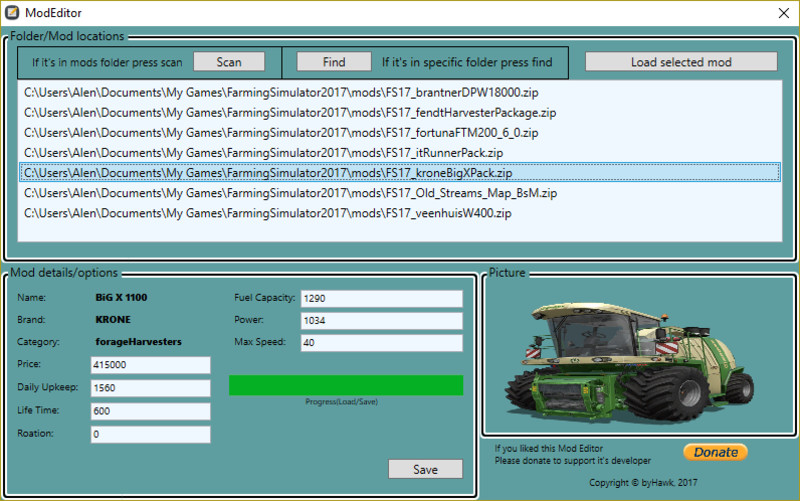
Here I present you my new tool for making your mod managing easier. With this tool you can easly change your mod's settings like price, daily upkeep, etc. It's very easy to use just scan, edit and save, that's all it takes!
How to use
As I've mentioned it's very simple to use. At start you will have two buttons to start with. Button 'Scan' will scan the folder where the editor is located and the mods folder in your documents and they will all appear in bottom box. Next is 'Find' button if you have some mod that is in some other folder and you wish to edit it, when pressed it will open the dialog for you to choose it's path.
Once you've scaned and found your mods then just click once on desired mod you wish to edit and press 'Load selected mod'. After loading (if it's a bigger mod it will take few seconds) your mod's stats will appear in bottom section of editor which include it's picture and basic info of them. There you will be able to edit the stats. For now it may seem a little but newer future versions are very soon to come which will bring more options and possibilites!
Comments17
You must be logged in to comment.
Lieber Simu tools bitte, wenn du es schon nötig hast dein eigenen mod überall unter aneren mods zu bewerben dann sorg wenigstens dafür das dein Script richtig läuft sry aber für sowas hab ich kein verständnis
Schade kann den Mod nicht runterladen. es öffnet sich keine Download Linke
Habe die Geschwindigkeit bei einem Fahrzeug geändert, konnte dann im Spiel das Fahrzeug nicht kaufen. !!
Versuch es mal mit ModStudio damit sollte es klappen :) gibt es auch auf
schoene sache denke ich , noch n bissel an der funktion arbeiten den ist es auch brauchbar, scan finden und so, bearbeiten dieverser mod´s funzt leider nicht
Danke, wo muss die "ModEditor v1.1.exe" Datei rein? Die .exe in den Mod-Ordner? In der Beschreibung steht "wo der Editor und den Ordner mods in Ihren Dokumenten befindet". Bekomme bei "load selected mod" keine Statistik angezeigt Danke für Aufklärung