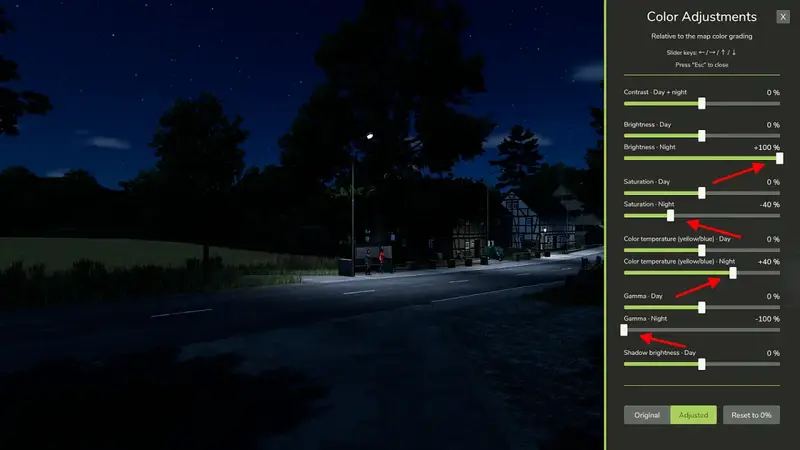
Map Color Adjustment
Map Color Adjustment lets you customize the colour grading of the currently loaded map directly in-game to suit your preferences.
- Contrast for day and night
- Brightness for day and night
- Saturation for day and night
- Colour temperature for day and night
- Gamma for day and night
- Shadow brightness for daytime
Every slider ranges from −100% to +100% and can be adjusted in 1% increments. A value of 0% leaves the map's original appearance unchanged.
Key features:
- Separate settings for day and night
- Individual settings for each map
- Direct colour grading adjustments with no FPS loss
- HUD elements retain their original colours
- Clear controls in a side panel
- Compatible with ReShade and the NVIDIA game filter
- Compatible with DLSS 5 Neural Rendering
Because the adjustments are applied directly to the game's colour grading, the GIANTS Engine provides smooth colour transitions in the morning and evening, even when day and night values differ significantly.
Please note: The “Shadow brightness” slider also affects other dark colours and image areas in addition to shadows. It only applies during daytime.
Use the “Original / Adjustment” switch to compare the unchanged map appearance with your custom settings at any time. “Reset to 0%” returns all sliders to their default values after confirmation. Settings are automatically saved as a template for new maps and separately for the currently loaded map.
In multiplayer, the adjustment is applied locally only and does not change the appearance seen by other players.
Default shortcut: Right Shift + V. The key binding can be changed under Options > Controls.
Comments
You must be logged in to comment.
No comments yet.