1 / 10
★ 4.2
Rating
245 Ratings
33.8K
Downloads
203.0K
Views
73
Thanks
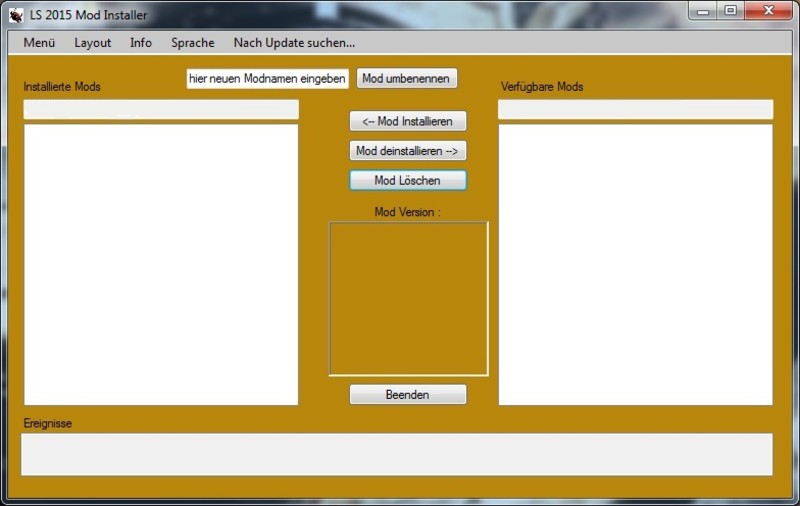
What makes the LS15 Mod Installer:
- This tool is installed and uninstalled mods easily
- By List view one has a good overview of the Mods in the download folder, because all other files that do not mods are not be displayed
- Overview of the installed mods
- At a glance you can see what is in the Mod Shop as the images are displayed. So it saves the hassle of unpacking the Mods
- Will not the standard Windwos download folder used may be adjusted in the menu which folder is used and stored for the next use
- If the LS15 Mod folder is also outsourced these can also be set
- View details of mods (price, name, author, etc.)
- Price and maintenance costs can be changed in the Datail view
Minimum Requirements:
Windwos Vista / 7/8/10
For suggestions, requests or problems, please PN.
Update Version 1.0.0.19
- Increased starting speed
- Improve program stability
- Improved Update function
- it can now be geucht to manually check for updates
- Mods can be renamed with the progam
Update Version 1.0.0.15
- English version available (menu language)
- If you try to install an already installed mod, the mod can now overwrite it
- The size of the main window can now be customized (maximize or by dragging the edges)
- Program test under Windows 10 -> running
Update Version 1.0.0.11:
- Future version changes are now displayed when the program is started the first time after an update
- Version changes can be found under Info> Update Notice
Update Version 1.0.0.10:
- NEW: Different layouts available
Update Version 1.0.0.9:
- Mods are now copied and no longer postponed
- Subfolders in the download directory will now also be searched
- small adjustments
Update Version 1.0.0.5:
- Enhancements of the details
- Map images are now displayed
Update Version 1.0.0.4:
- Savegame Editor available in the menu
Update Version 1.0.0.3:
- New Mods are recognized in the download folder and added to the list, while the program is running
- Incorrect or corrupted files in the folders that are recognized and ignored
Update Version 1.0.0.1:
- Detailed overview available (right-click on a mod)
- Price and service are subject to change in the detail overview
- under Info> last mistake you can open the errorlog and let the last error displays
Update Version 1.0.0.0:
- It can now be a double-click on a mod installed or uninstalled
- About the picture Mod version now appears
- div decisions when right clicking on a Mod
Update Version 0.9.0.17:
- Fixed an issue with the "bouncing list"
- Problems with benutzerdefenierten folder
- small improvements
Comments112
You must be logged in to comment.
wie funtioniert die mod? also muss man irgend was machen wenn man sich die mod downlodet?
Leider kann ich keine Mods Installieren da jedesmal eine Fehlermeldung auftaucht!
Vorschlag wäre, wenn man Mod deaktivieren kann oder wieder aktivieren, z.B. Gülle Kalk Moder oder SoilManagement.
Es ist eine komplett neue Version des Mod Installers in Arbeit, der neue Funktionen und verbesserte Stabilität bietet. Dort werde ich die vorgeschlagenen Funktionen und Wünsche so gut wie möglich einbauen.
Immer wenn ich einen Mod über den Modinstaller instalieren will kommt die Fehlermeldung: Unbehandelte Ausnahme in der Anwendung. Klicken Sie auf weiter um den Fehler zu ignorieren und die Anwendung fortzusetzen. Wenn sie auf Beenden klicken wird die Anwendung sofort beendet. Der Zugriff auf den store.dds wurde verweigert. Was muss ich da ,machen damit das nicht mehr kommt?
Hi Great work. Any chance for an English menu? This will be brilliant....
Zugriff auf die moddesc.xml verweigert.. bei jedem mod.. bitte beheben
moin moin , habe da ein problem:-) ich kann den mod nicht runter laden woran liegt das ? MFG Bulldog60
Ok, habs grad gemerkt. Der Modhoster-Highspeed download brauchte bei mir mehrere versuche bis es geklappt hat. Bei dem anderen Downloadlink hab ich mich leider verschrieben, darf aber nur von Modhoster selbst geändert werden... Wenns weiterhin Probleme mit dem Download gibt schick ich dir was per PN.
kann man damit auch objekte installieren die sonst nur mit gigantseditor gehen?
Mann mus wenn schon alle dateien haben und zu ner zip zusammenpacken
das ist leider nicht möglich
hat der mod einer sicherheitstaste falls ich mich mal verklicke.
es fragt nach ob du bestimmte aktion wirklich ausführen willst
Wenn ein Mod mehrere z.B. LKW´s enthält: Klickt man auf Details dann kommt folgende Fehlermeldung: Unbehandelte Ausnahme in der Anwendung ... Die Eingabezeichenfolge hat das falsche Format. Klickt man dann auf weiter geht ein neues Fenster auf und es wird nur 1 LKW angezeigt ohne Daten wie Preis, Power usw. Sonst toller Mod.
ja und wie sieht es aus mit Server ???? Da wird es wohl nicht gehen allso Sinnlos
sehr schöne Sache, vielen Dank dafür :)