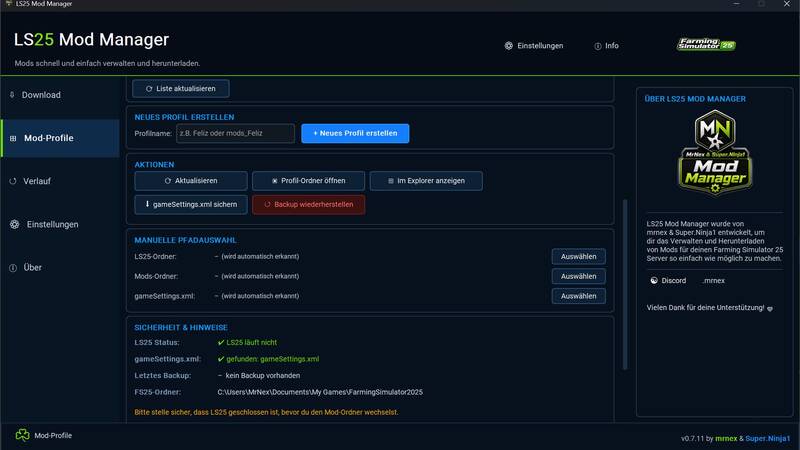
Mod Manager
The FS25 Mod Manager is an essential external Windows tool designed for managing Farming Simulator 25 mods. It enhances your gaming experience by allowing you to download mods, replace existing ones, and manage different mod profiles effortlessly. This feature enables quick switching between various mod folders, ideal for servers, maps, tests, or backups.
Features:
- Download FTP mods
- Automatically replace existing mods
- Manage mod profiles
- Switch active mod folders
- Utilize different mod folders, e.g., mods, mods_Feliz, mods_Server, mods_Test
- Automatically back up gameSettings.xml
- Backup before each profile switch
- Restore backups
- LS25 process check
- Profile switching is blocked if LS25 is still running
- Automatic path detection for Documents / OneDrive
- Dynamic detection of OneDrive special folders
- Manual path selection possible
- History / Log
- Save settings
- Dark modern design
Important:
Switching profiles does not automatically move or delete mods. The tool only changes the active mod path in the gameSettings.xml file. A backup of the gameSettings.xml file is automatically created before each change. If Farming Simulator 25 is still running, profile switching will be blocked for security reasons.
Requirement:
- Windows
- Farming Simulator 25
- LS25 must be closed before switching mod profiles
Note regarding Windows SmartScreen:
Since this is a self-created external Windows tool, a Windows SmartScreen message may appear on first launch: "The computer was protected by Windows". This does not automatically mean that the file is dangerous. Windows often displays this message for new or unknown EXE files, especially if they are not digitally signed.
To begin:
- Click on "More information"
- Then select "Run anyway"
The tool is an external Windows application and not an in-game mod.
Installation:
- Download the ZIP file.
- Extract the ZIP file.
- Run LS25_ModManager_v0.7.11.exe.
- If the LS25 folder is not automatically detected, select the path manually.
- Select the mod profile and activate it.
Further development:
The LS25 Mod Manager is still being actively developed. Further features, improvements, and bug fixes are planned. If you encounter any errors or something doesn't work as expected, please report it. Feedback, suggestions, and bug reports help us to further improve the tool.
A notice:
This tool is not an in-game mod, but an external Windows application. Use at your own risk. Please keep your own backups before use.
Comments
You must be logged in to comment.
No comments yet.