Mod Mixer
Mods often silently conflict with each other. When two mods alter the same game function, the one that loads last usually prevails, causing the other mod's work to vanish without any error, crash, or explanation. Mod Mixer identifies these conflicts, explains them clearly, and provides a control panel to resolve them.
The Switchboard
Access a comprehensive control panel in the in-game menu (look for the Mod Mixer icon) with six tabs:
- CONFLICTS: View all mod conflicts in one place. Choose a winner (that mod wins, others are muted) or activate a shared chain to set the run-order. Options include SIMPLE (ranks mods, higher wins), BY CATEGORY (settles one realm at a time), and ADVANCED (shows every contested function with its full hook chain).
- LIVE: Instantly adjust settings your mods expose (toggles and sliders), applied in-game immediately.
- VEHICLE: Live diagnostics of the machine you're in: damage, wear, temperature, speed, mass, per-wheel grip.
- PERFORMANCE: Live per-mod cost (ms per frame) against your fps budget. Identify the mod affecting your frame rate and disable it without uninstalling.
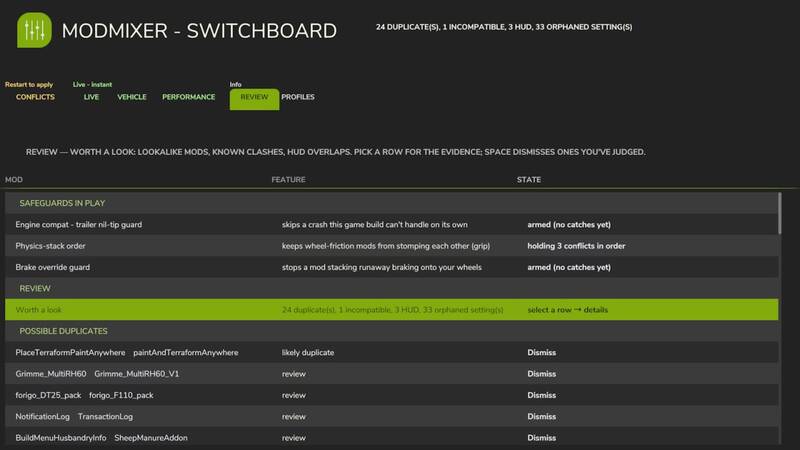
- REVIEW: Check for likely duplicate mods, known incompatible pairs, HUD overlaps, each with evidence. Dismiss what you've assessed.
- PROFILES: Save your entire Mod Mixer setup (conflict picks, reorders, toggles, hibernation) under a name and reload it anytime.
Each row includes a plain-English explanation. You still receive the classic boot conflict report (ModMixer.log, next to your game log) and an on-screen warning for incompatible mods.
Built Safe
- Structural changes (reorder, mute) apply on restart—nothing rewires mid-game.
- Load-critical functions are locked and cannot be vetoed.
- If a launch fails to complete, the next one starts in safe mode automatically (all levers off) to ensure your game always loads.
- Manual kill switch: create an empty file MODMIXER_SAFE_MODE.txt in modSettings/FS25_ModMixer/.
- Disk footprint: Mod Mixer only stores its settings, profiles, and a boot-recovery marker under modSettings/FS25_ModMixer/—nothing elsewhere, and it makes no network connections.
- Abnormal-load protection: if a load starts without a farm (a conflict brick), Mod Mixer blocks that session's saves to prevent overwriting your existing savegame, then self-recovers on the next launch.
IMPORTANT: Keep the zip named FS25_0_ModMixer.zip—this ensures it loads before other mods, allowing it to see every hook they install.
Multiplayer: Loads and reports per client; the Switchboard's levers are intended for singleplayer.
Changelog 1.4.0.0:
- The Switchboard—six-tab control panel (Conflicts / Live / Vehicle / Performance / Review / Profiles)
- Performance profiler with live per-mod frame cost and Park
- Review hub, vehicle diagnostics, and boot-recovery safety net
Comments
You must be logged in to comment.
No comments yet.