1 / 4
Virus checked
v1.0.1.0 latest
Free Mod
Mouse Click Actions for Vehicles
–
Rating
0 Ratings
0
Downloads
52
Views
0
Thanks
Mouse Click Actions lets you control vehicle functions directly with your mouse. Interaction points can be clicked from inside the cab or while standing beside the vehicle.
Without Interactive Control:
- Hold R to freeze your view and free the mouse cursor. Releasing it restores the normal view and head tracking.
- A short press of R continues to perform its normal in-game function.
- Click an interaction point to activate the corresponding action.
- Use the mouse wheel to zoom in while holding R.
- Head-tracking systems such as TrackIR, Tobii and opentrack can be used to aim the mouse cursor.
- Interaction points out of range are shown in gray. Points belonging to an unattached implement remain hidden.
- Doors, windows, engine covers and other parts opened with the mouse retain their position when saving and loading. Players joining later also see them in their current state.
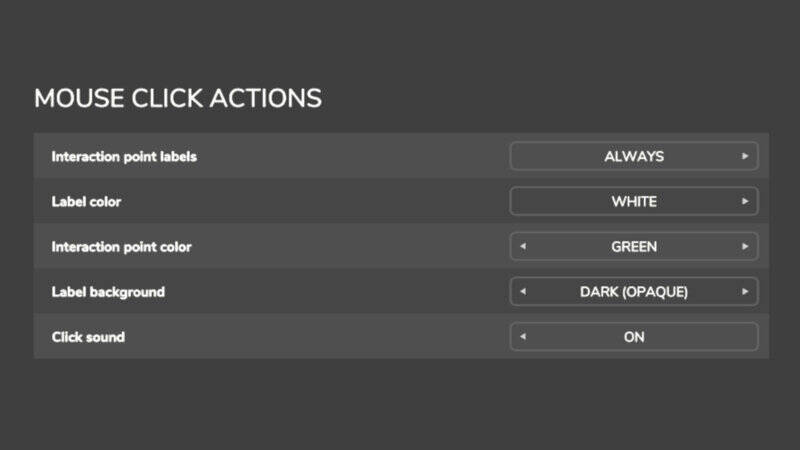
- Labels, colors, backgrounds, click sounds and the appearance of messages and warnings can be customized.
With Interactive Control:
- Mouse Click Actions adds text labels to the interaction points provided by Interactive Control.
- All actual interactions are still handled by Interactive Control.
- Labels only appear at points that Interactive Control itself displays.
- Settings that apply only without Interactive Control are grayed out.
In both cases: Press Right Ctrl + F12 to open the Kijbev help window containing the key assignments of all active Kijbev mods.
These features are available for vehicles whose files contain interaction points for Interactive Control, which is the case for many modded vehicles.
This mod may only be published through the official GIANTS ModHub. Redistribution on other websites is not permitted without the author's written approval.
Comments
You must be logged in to comment.
No comments yet.