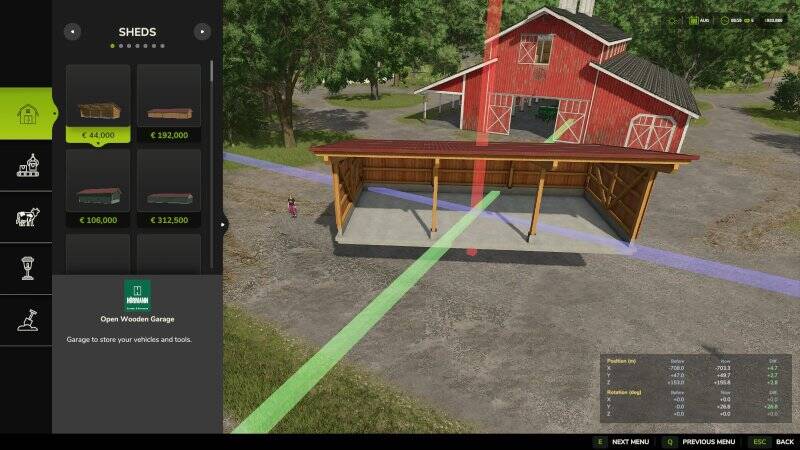
Move Placeables Advanced
This mod allows you to freely reposition placed objects (placeables) on the map. It supports moving along all three axes (X, Y, Z) as well as rotation on all three axes.
How to use:
– Open the build menu (default: Shift + P)
– Click on a placed object
– Select the Move button
– Left-click on one of the displayed axes (green, blue, red) and move the mouse to translate the object along the selected axis
– Right-click on an axis and move the mouse to rotate the object along that axis
– Confirm your changes by clicking the object again or pressing Escape (with a final confirmation prompt)
– Press Escape at any time to cancel the changes
Guide lines (enabled by default):
– White lines: Area for leveling and texturing
– Pink lines: Collision area (not shown in free mode)
– Yellow lines: Fence layout (shown while moving)
Settings:
– Toggle free moving (no costs)
– Show coordinate overlay (start and current position/rotation)
– Refund costs when undoing fence placement
– Align movement axes to the object or to the world
– Toggle guide lines when buying and/or moving objects
This mod replaces the previous "Rearrange Placeables" version and offers extensive improvements for both singleplayer and multiplayer.
Comments
You must be logged in to comment.
No comments yet.