1 / 6
Virus checked
v0 latest
Free Mod
Path and Area Designer
–
Rating
0 Ratings
1
Downloads
27
Views
0
Thanks
Create field paths and freely shaped areas directly in Build Mode. Simply place control points, adjust the available settings, and review the result in the preview.
- Field paths: Two points create a straight field path. Curves become possible from the third point onward. Optionally, two parallel paths can be created with adjustable spacing and the second path can be placed on either side.
- Grass along field paths: Grass is applied to the left, right, and between the wheel tracks. The two wheel tracks themselves remain unchanged.
- Ground layer for field paths: The GRASS ground layer is automatically applied beneath grass areas. A ground texture from the current map can be selected for the wheel tracks. Available ground textures are detected automatically.
- Area ground layers: Draw a closed area and use one to five ground textures. A single texture covers the entire area. With multiple textures, their shares can be adjusted and blended naturally.
- Vegetation areas: Choose one to five vegetation types from the current map. Grass covers the entire area, while shrubs are distributed loosely and naturally. Plant spacing can be adjusted in 0.5-meter steps. Each area supports up to 5,000 shrubs; grass does not count toward this limit.
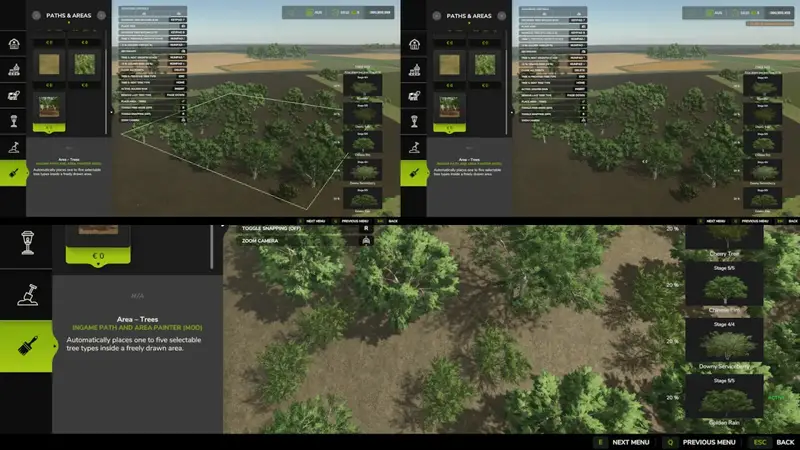
- Tree areas: Select one to five tree types from the current map and adjust their proportions. Tree spacing can be set in 1-meter steps, and the growth stage is selectable. Only saplings placed at growth stage 1 continue growing after placement; trees at higher growth stages remain unchanged.
Controls:
- Left-click: place a control point. Right-click: remove the last control point.
- Enter: place the field path or closed area. Delete: reset all control points.
- Page Up/Page Down: select one or two field paths, or add and remove area slots.
- Numpad +/−: adjust the spacing between two paths or the share of the active area slot.
- Numpad 7/9: adjust plant or tree spacing.
- Insert: switch the side of the second path or change the active area slot.
- Home/End: select the next or previous ground texture, vegetation type, or tree type.
- Numpad */÷: change the tree growth stage.
Notes: Close an area or circular path by clicking close to the first point; the final point snaps within two meters. Control points can only be placed on land owned by you.
Comments
You must be logged in to comment.
No comments yet.