1 / 1
Virus checked
v1 latest
Free Mod
PowerGrid assignment
★ 4.4
Rating
66 Ratings
1.9K
Downloads
11.8K
Views
11
Thanks
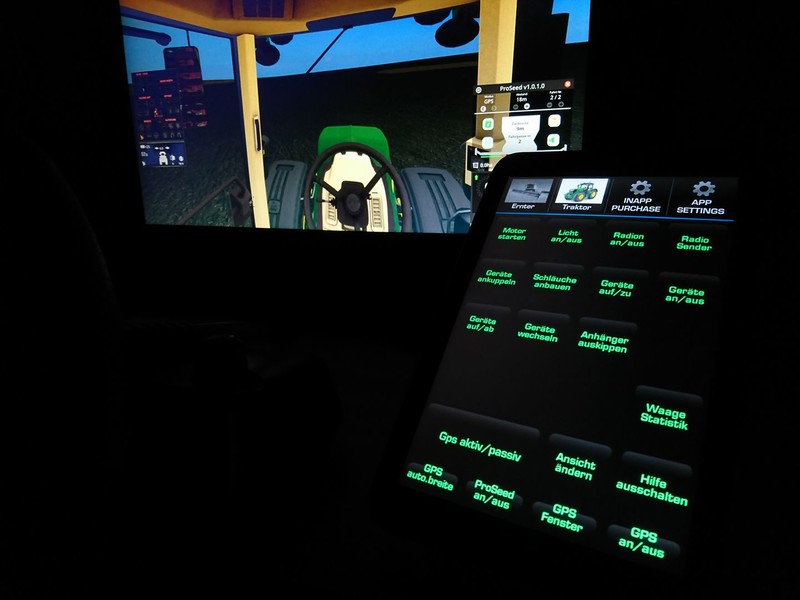
Roccat PowerGrid is a software that allows you to display the keyboard layout of the agricultural simulator on tablet / mobile phone
What you need:
1. http://www.roccat.org/en-US/Product... for the PC on the left
2. Download the Roccat PowerGrid app from the Play Store
3. Register and connect! How do you get here ----> http ://www.roccat.org/en-GB/Product... need only be watched until 1.00min. (Failure to login or register please contact the support of Roccat PowerGrid ----> http ://www.roccat.org/en-GB/Support...)
4. you have connected and PowerGrid is open you go to the top of the tab on EDITOR -> bottom left to Import and choose one of the grids you have in the downloaded folder. Then put the tick at HBModding Traktor / Ernter depending on what is there and then click on import then click Apply .... the same makes you then with the 2 grid synonymous. APPLY Click not forgotten now the grid should be on tablet or mobile to watch
-Weight with statistics is only if a map has installed the scale. Actually, all occupancy should be standard from LS
-Sleeves and cardan shaft is a button
Comments44
You must be logged in to comment.
Läuft alles super! Top Arbeit, echt klasse gemacht! :)
Was noch fehlt, ist wenn du GPS an hast, das du auch den Tempomat drüber steuern kannst, also nur an und aus, oder übersehe ich da was? :P
Funktioniert SUPER und die Anleitung / Beschreibung ist einfach beschrieben bzw. erklärt.
Danke =) freut mich zu lesen
Works perfect. Thank you. More controls are always appreciated as is this development.
I dont know :) Do you miss any Thing?
Hat das schon jemand geschafft sich bei roccat anzumelden? Hab das mit 3 unterschiedlichen Emails versucht und jedes Mal sagt die app das passwort oder Email Adresse falsch ist. Ich verzweifel hier noch
Mehrfach, bekomme aber nur den Hinweis das das an eine andere Firma abgegeben wurde die sich kümmern würde. Von der gibt's leider keine Antwort
Hast mal den Support kontaktiert
Geht das mit jeder Tastatur oder muss es eine Roccat sein ? Hab ich das richtig verstanden, ich stelle mein Tablet hier auf meinen Tisch und nutze es um all die Befehle in LS zu betätigen ? Also als Art Control Panel ?
Ja genau es ist damit man praktisch die Tastaturbelegung aufn Tablet hat als Button mit Beschriftung. Tastatur ist egal welche du hast. Roccat ist ja das Programm
leider hab ich das gleiche Problem wie matt26 das die app funktioniert in Windows aber leider nicht in LS17 trotz das ich die standart Belegung habe
Hmm okay ich schau nochmal habt ihr denn auch auf anwenden gedrückt?
hallo freunde, wo finde ich denn bitte die grids ?
Wir meinst du das denn?
jo leider nur funktioniert es nicht am galaxy not 4 ,mfg