1 / 4
Virus checked
v1.0.0.0 latest
Free Mod
ProVision EVO
–
Rating
0 Ratings
8
Downloads
133
Views
0
Thanks
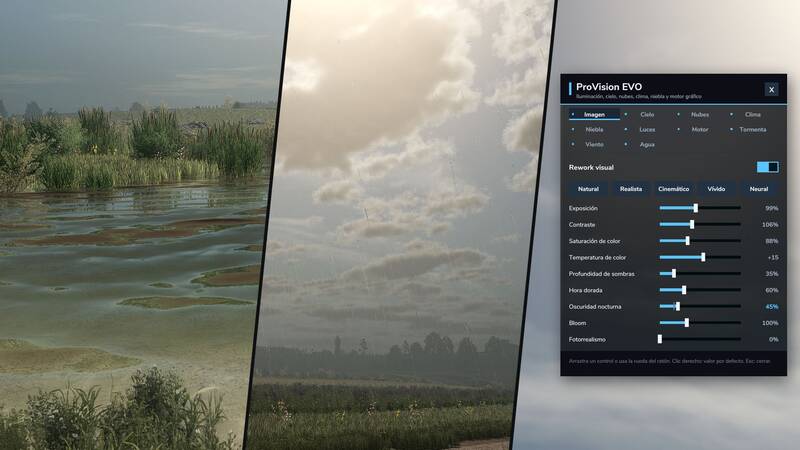
ProVision EVO is a comprehensive graphics and weather overhaul that visually transforms every map in real time. Lighting, colours, sky, clouds, rain, fog, storms, water and vegetation can be adjusted while playing through a dedicated settings panel. No game files are modified.
Highlights
- Atmospheric clouds: Weather-aware cumulus clouds with deep blue sky gaps, silvery cloud light during the day, moonlit clouds at night and golden or rose-coloured cloud undersides at sunrise and sunset.
- New lighting: Individual lighting moods for every map, image presets such as Natural, Realistic, Cinematic and Vivid, and adjustable exposure, bloom and lens flare.
- Moon and night sky: A larger moon, brighter stars, the Milky Way, a moon halo and longer twilight periods.
- Rain and weather: Realistic raindrops and splashes that remain visible with DLSS, FSR and XeSS, plus wet surfaces, rain showers, snowflakes, morning mist and rainbows after a downpour.
- Volumetric fog: Realistic fog across the entire map, becoming thickest around dawn and dusk. Headlights and lamps create halos and visible light beams.
- Thunderstorms: Heavy rain can develop into thunderstorms that build up and move across the map. Branching bolts illuminate the landscape, clouds flicker and up to three strikes can occur at once. Thunder arrives later over greater distances and sounds muffled inside the cabin.
- Wind and vegetation: Trees, bushes and plants visibly react to the wind, while dry fields produce blowing dust. A dedicated tree shader lets sunlight shine through the canopy and gives every tree its own shading.
- Realistic water: A custom water shader for ponds, rivers and lakes features a new wave texture, caustics on shallow bottoms, foam at the shoreline and rain rings on the surface.
- Vehicles and renderer: Clear coat effects with sharp reflections of the sky and sun, plus soft light beams for vehicle, building and street lighting. An extended draw distance can be enabled optionally.
Settings
Open the settings panel with Left Ctrl + P. The shortcut can be changed in the controls menu. Tabs are available for Image, Sky, Clouds, Weather, Fog, Lights, Renderer, Storm, Wind and Water. All values are saved automatically. Right-click a value to reset it to its default.
Installation
- Download the ZIP file.
- Copy the ZIP file, without extracting it, into Documents/My Games/FarmingSimulator2025/mods.
- Start the game and activate ProVision EVO in the mod selection of your savegame.
Compatibility
- For Farming Simulator 25 on PC.
- Works on every map, including base-game and mod maps.
- Multiplayer is supported. Lightning, thunder and dust are displayed separately on each computer.
- Can be combined with ProNaturLife for wildlife, hunting and fishing.
- Not available for consoles because the mod uses custom shaders.
ProVision EVO is free. Voluntary support is available through the creator's linked donation options.
Comments
You must be logged in to comment.
No comments yet.