1 / 2
Virus checked
v2.0.0.0 latest
Free Mod
RollingRon Mod Manager PROFI
–
Rating
0 Ratings
21
Downloads
433
Views
0
Thanks
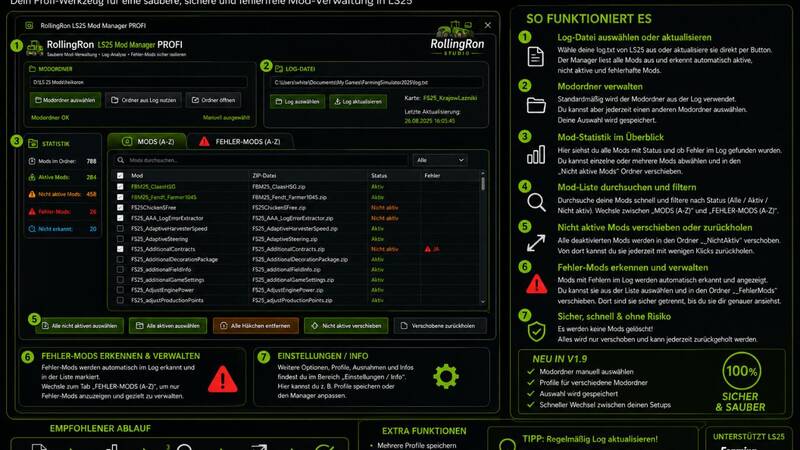
The RollingRon Mod Manager PROFI helps you quickly locate active, inactive and faulty mods – without having to laboriously search through the mod menu or your mod folders. Mods are automatically detected based on the log file and displayed in a clear overview. Unused or faulty mods can be safely set aside and restored at any time – without deleting them.
Features
- Manually select the mod folder
- Automatically use the mod folder from the log file
- Select and update the log file at any time
- Display mods alphabetically from A–Z
- Detect active mods
- Detect inactive mods
- Detect and assign faulty mods based on the log
- Display mods that could not be clearly identified
- Search and filter mods specifically
- Select individual or multiple mods
- Select all inactive mods with a single click
- Move inactive mods out of the active mod folder
- Restore moved mods at any time
- Isolate faulty mods separately
- Restore faulty mods
- Display error details from the log
- Export detected errors as a TXT file
Safe Archiving Instead of Deleting
The manager deliberately follows a safe principle: when archiving mods, the selected mods are not deleted but moved to separate folders. This means they can be restored at any time.Error Analysis
The integrated error section analyzes the current log file and attempts to assign error messages to the corresponding mods. Detected faulty mods are displayed separately and alphabetically – making it much quicker to investigate a problematic mod folder.Ideal for Large Mod Folders
Especially with several hundred mods, it quickly becomes unclear which ones are actually being used. The RollingRon Mod Manager PROFI provides a clear separation between active, inactive, faulty and not clearly identified mods.Installation
- Fully extract the download
- Launch the RollingRon Mod Manager PROFI
- Select the log file
- Select the desired mod folder or use it automatically from the log
- Analyze and manage your mods
Comments
You must be logged in to comment.
No comments yet.