Searchables – Shop, Construction & Map
Adds fast search boxes to the Shop, Construction, and Map screens. Click a search field and type to update the results as you go. “Where’s My Stuff” is already included.
- Shop: Filter the list by category or brand. You can also search the entire shop by brand, DLC, mod name, or mod author.
- Specification filters: Search by price, horsepower, working width, capacity, weight, speed, required power, and
affordable. Combine search terms with filters, for examplefendt hp>300 $<400k. - Construction: Find buildings in every category and tab by name or product. For example,
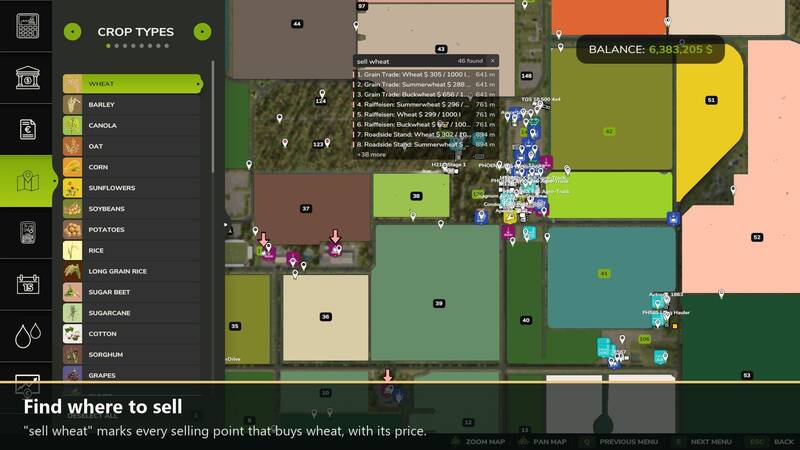
peasfinds every factory that produces or uses peas. - Map: Find your vehicles, including by license plate, as well as bales, pallets, buildings, fields, and properties. Every match is marked with an arrow, while the nearest matches are listed beneath the search field.
Additional map searches include wheat ready, sell wheat with the best price marked, for sale $<100k ha>5, contract, fuel<20, and stored wheat. Searches using a field state such as wheat ready, growing, withered, or harvested now consider fields only.
Controls: Press Ctrl+F or click the right stick on a controller to jump into the search field. Press Enter to keep the search and Esc to clear it. A search box is also available under Settings & Controls. All features are explained in the in-game Help menu under “Searchables”.
By DTM Mods (Fennell). Support and bug reports: Discord.
Comments
You must be logged in to comment.
No comments yet.