Official FMC (Freelance Modding Crew) Release
Unzip ParsnipPack to desktop (Contains Parsnip.zip and readme)
Unzip Parsnip.zip to Desktop
Double click Parsnip.exe to start
The fruit register elements of a map need to be in a folder called "MapFruits" in the map folder for elements of The Parsnip to work.
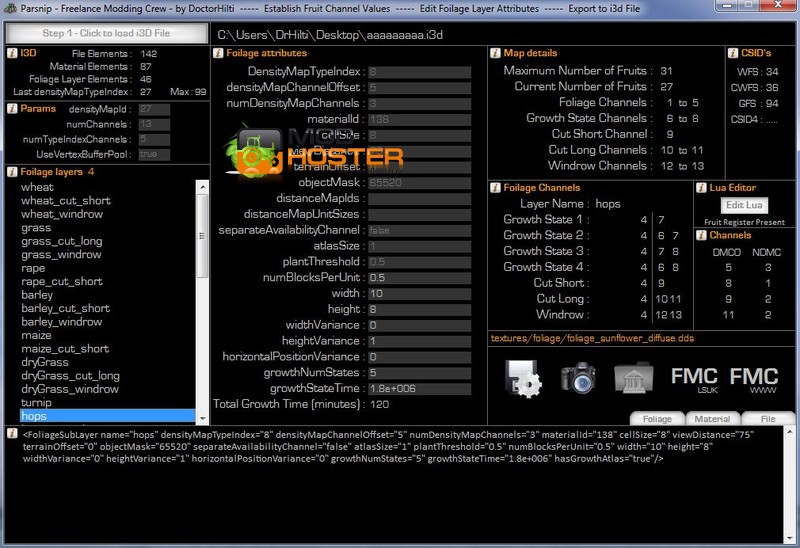
The Parsnip displays fruit elements and attributes from a selected map. These include the channels required to paint a fruit in GE. Other information can be used to diagnose and identify problems in a map. You can also edit some of the basic parameters of a fruit such as growth time or height etc. The resulting edit can be exported to your desktop. The small "i" buttons contain help. Many items have mouse over pop up help as well. Please note that if you are presented with a warning sign an error has been detected in the map you have chosen to load into the Parsnip and any edits will probably fail and the information displayed may be incorrect.
Do not upload to any other site without permission, as per our copyright - http://www.freelancemoddingcrew.info/?page_id=107
Comments6
You must be logged in to comment.
Offizielle FMC (Freelance Modding Crew) VERÖFFENTLICHUNG Entpacken she ParsnipPack Auf Desktop-(enthält Parsnip.zip und Readme) Entpacken she Parsnip.zip zum Desktop- Doppelklicken she Auf Parsnip.exe zu starten Die Frucht registrieren Elemente Einer Karte Müssen in Éinen Ordner Namens "MapFruits" in der Karte Ordner für Elemente der Pastinake zu Arbeiten. Die Pastinake zeigt Früchte Elemente und Attribute aus Einer ausgewählten Karte. DAZU gehören sterben Kanale Benötigt, ähm Eine Frucht in GE zu malen. Weitere Informationen KONNEN verwendet Werden, um zu diagnostizieren und zu identifizieren probleme in Einer Karte dokumentiert. She Konnen available einige der grundlegenden Parameter Einer Frucht Wie wachstum Zeitpunkt Oder Höhe usw. Die resultierenden bearbeiten KONNEN Auf Ihrem Desktop-Werdener exportiert. Das kleine "i"-Buttons enthalten Helfen. VIELE Haben Gegenstände mit der Maus Über Pop-up-Als Auch zu Helfen. Bitte beachten SIE, dass., wenn Kaufen mit Einem Warnhinweis präsentiert Ein Fehler in der Karte, sterben she gewählt, um in Die Pastinake Letzte Haben Alle Änderungen und Werdener wahrscheinlich fehlschlagen und sterben angezeigten Informationen möglicherweise Falsch erkannt wurde. Laden she keine zu Einer Anderen Webseite ohne Erlaubnis, entsprechend unseren Copyright - http://www.freelancemoddingcrew.info/?page_id=107
Firstly, apologies for the Google Translated description, I used to know German but it has been a long time since I have used it. This version of the application is technically a Beta version with a glimpse of the work that is going on. There is work on a second version which hopefully will have the ability to add Fruits to a map and possibly more. If there is someone willing to help translate descriptions from English to German we would be very grateful so that we can get the true nature of our mods across to you guys. FMC
Kann man sich damit das von- hand eintragen der früchte ersparen? Also installieren und gut?
FMC heißt bei mir eigentlich Fresenius Medical Care, aber gut :D:D Ist nichts für mich, scheint aber ganz cool zu sein ;)
Ist es damit möglich ander Früchte in Maps zu instalieren-deinstalieren oder kann man die Früchte damit nur skalieren und wachstumszeiten ändern?