1 / 6
Virus checked
v1.0.0.0 latest
Free Mod
Tramline Pilot - AI Sprayer & Tramline Planner
–
Rating
0 Ratings
1
Downloads
106
Views
0
Thanks
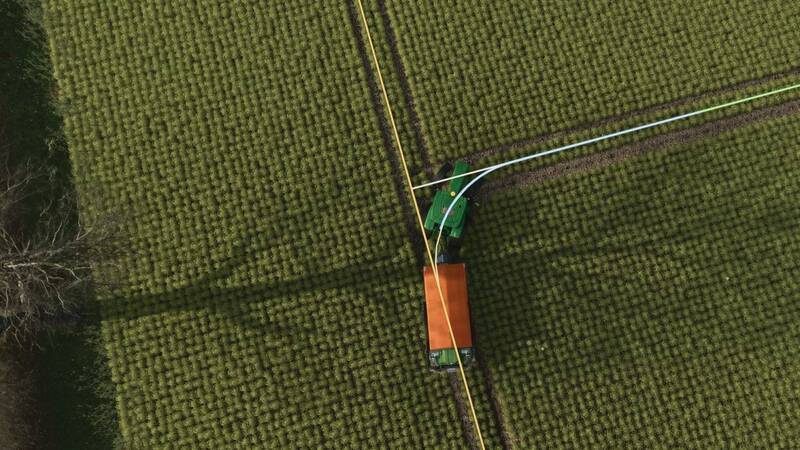
Tramline Pilot plans tramlines for every field, draws them on the field map and guides the AI worker so it sprays, turns and travels on those lines only - no more driving over the crop.
Features
• Tramlines are calculated once and stored, so the same wheelings are used year after year
• The AI worker sprays, turns and avoids the crop, including while refilling
• Works together with AutoDrive: place a marker at the field gate as target and the refill point as second target
• Optional tramlines in the crop (wheel tracks or a full lane), replaces the Precision Farming tramlines (PF not required)
• „Back into corners“: the sprayer reverses into sharp headland corners (self-propelled and mounted sprayers)
• Unfinished jobs are saved and can be continued on another day
• Coloured lines: white = main tramlines, amber = headland tramlines, green = next spraying section, blue = driving with the boom off
• „Saved wheelings“ for every layout, usable in all savegames on the same map
Installation
Copy the ZIP file into your mods folder and enable it in the mod list of your savegame.
Controls
• Right Ctrl+M: setup menu on the field
• Alt+T: start / stop the worker, Alt+Q: stop the worker
• Alt+4: show or hide the lines
• Alt+1 / Alt+2: set points A and B
• Space: saved wheelings, Esc: back
Console
Features
• Tramlines are calculated once and stored, so the same wheelings are used year after year
• The AI worker sprays, turns and avoids the crop, including while refilling
• Works together with AutoDrive: place a marker at the field gate as target and the refill point as second target
• Optional tramlines in the crop (wheel tracks or a full lane), replaces the Precision Farming tramlines (PF not required)
• „Back into corners“: the sprayer reverses into sharp headland corners (self-propelled and mounted sprayers)
• Unfinished jobs are saved and can be continued on another day
• Coloured lines: white = main tramlines, amber = headland tramlines, green = next spraying section, blue = driving with the boom off
• „Saved wheelings“ for every layout, usable in all savegames on the same map
Installation
Copy the ZIP file into your mods folder and enable it in the mod list of your savegame.
Controls
• Right Ctrl+M: setup menu on the field
• Alt+T: start / stop the worker, Alt+Q: stop the worker
• Alt+4: show or hide the lines
• Alt+1 / Alt+2: set points A and B
• Space: saved wheelings, Esc: back
Console
tlNewJob, tlRefill, tlPaint, tlWheelings, tlLoad, tlSave
Comments
You must be logged in to comment.
No comments yet.