Headland Management
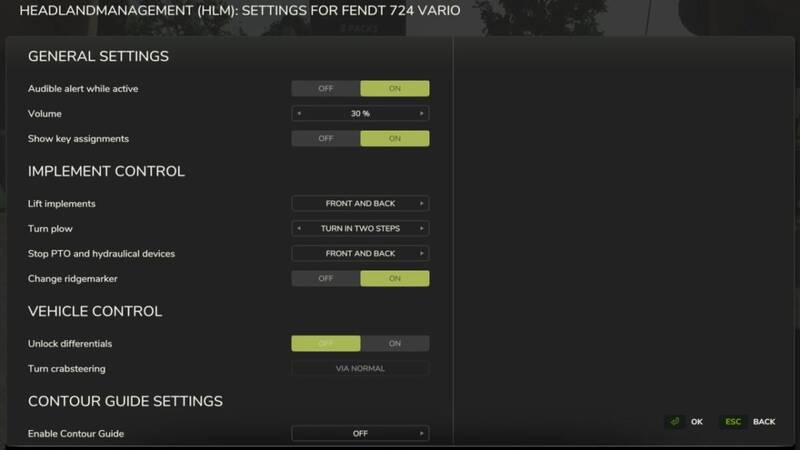
Headland management allows functions to be combined in the vehicle and activated together at the touch of a button to simplify turning maneuvers during field work. All functions can be activated and deactivated individually for each vehicle via a GUI to achieve ideal adaptation to the work being carried out.
Headland management must be added to the respective vehicle as a one-time configuration in the shop or in the workshop before use. The cost for this is $3000. It can be activated and deactivated in the vehicle. Various buttons can also be configured for activation and deactivation.
Functions included:
– Reduce speed (cruise control) and raise again, reactivate cruise control if it was previously active
– Raise lowered implements and lower them again, optionally raise front implements before raising rear implements
– Turn the plough, single-stage or two-stage (via the center position)
– Raise and change track markers
– Change sides with crab steering activated
– Switch off PTO shaft(s) and hydraulics and switch on again
– Warning tone when headland mode is activated
– On/off switch: The headland management can be switched on and off. This prevents accidental activation during transfer to the work site and improves road safety.
– Automatic headland management: Automatic activation of headland mode when the headland is reached. Optional return to field mode after completing the 180° turn.
– Option to temporarily deactivate headland automatic by pressing a button
– Contour guidance: Automatic control along the field boundary or along the cultivated area
– The configuration is saved and restored for each device type
With existing EnhancedVehicle (FS25_EnhancedVehicle):
– Deactivate and reactivate GPS lane guidance, optionally trigger the turning function
– Release and reset active differential locks
– Use of EV headland detection if it has been activated
Pre-assigned key combinations (can be changed):
– Switch headland management on/off: (left) Shift + (left) Alt + X
– Switch operating mode (field mode / headland mode): (left) Shift + X
– Call up GUI for configuration: (left) Shift + (left) Ctrl + X
Other prepared key combinations (not pre-assigned)
– Temporarily deactivating/reactivating (toggling) the headland automatic function
– Temporarily deactivating the automatic headland automatic function
– Reactivating the automatic automatic
– Activation of the field mode
– Activation of the headland mode
Version 3.0.2.0:
* Headland management is now compatible with Nexat
* Temporary correction of configuration handling is no longer necessary and has therefore been removed. ATTENTION: When updating to this version, all attached devices will be disconnected once when the game is started
Comments
You must be logged in to comment.
No comments yet.