Description
This is the LS15 version of AutoTractor ( http://www.modhoster.de/mods/autotractor ). Version 2.0 only works with FS15 patch 1.3 final.
How does it work?
AutoTractor automatically inserts itself into all vehicles if they already have the specialization aiTractor. When starting this alternative helper it briefly scans the field at the current tractor position. But apart from this, AutoTractor has only a little idea of ??where it is on the field. Instead, this mod looks, starting from the current position, for the border between untouched and already worked area is. This works much like AutoCombine.
However, a combine is much easier to steer. The cutter is mounted rigidly forward. Turning to the left, then the cutter goes to the left. In tractors, it is unfortunately more complicated. The tool can be mounted front or rear rigid. Larger tools are mounted in the rear and are movable. So turning to the left the cultivator or plough will first turn in the other direction. Therefore AutoTractor requires much more computing power. Actually, you can not calculate the route accurately enough without the FPS' going down strongly.
When you should not use AutoTractor?
On beautiful rectangular fields you can better use the normal hired worker. The headland settings in AutoTractor work for the normal hired worker as well. AutoTractor does not work together with other mods changing the behaviour of the hired worker .
If you want to go a a certain path on the field then I recommend using CoursePlay. For simple following tasks the mod FollowMe is great. I have the two mods together with AutoTractor in my mods folder.
Known Issues
Unfortunately, it happens again and again that frame rates drop. When starting AutoTractor you should make sure that the rear wheels of the tractor are already on the correct field. Concave field margins let the FPS decrease strongly. This problem I have not yet fully under control. Apparently, this phenomenon occurs less strong in circular mode.
For mowing grass you have to mow once around the area to be mowed around itself. The field-scanner then tries to determine the interior. Tedders are supported but windrows not.
How to
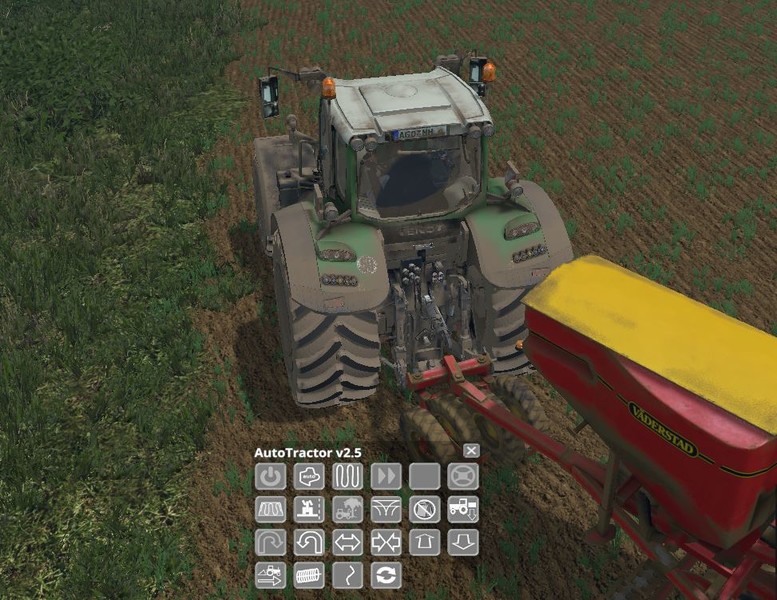
With the 5 key to open the AutoTractor hud . There you will find 15 buttons . Here whose assignment is in the following scheme:
A1 A2 A3 A4 A5
B1 B2 B3 B4 B5
C1 C2 C3 C4 C5
D1 D2 D3 D4 D5
- A1: hired worker on/off
- A2: swap between the built-in helper of Giants and the AutoTractor helper (default)
- A3: switching between up-/down-mode (default) and circular mode
- A4: automatic steering. Here AutoTractor only takes over the steering. You have to operate throttle and brake on your own.
- A5: during the turning maneuver you can jump to the next step . This is sometimes needed when the hired worker is stuck
- B1: headland on/off (default is off). Headland only works in up-/down-mode
- B2: small or big headland
- B3: collision check on/off (default is off)
- B4: turning mode
- B5: Seed consumption (Default is On). From Patch 1.2 of helpers used basically the existing seed. If this button is on then hired worker will stop once no more seed is in the tank.
- C1: this button activates the left margin
- C2: this button activates the right edge
- C3: increase maximum steering angle
- C4: reduce maximum steering angle
- C5: support for cultivators in front of a sowing machine
- D1: increase working width
- D2: reduce working width
- D3: more space when turning / headland
- D4: less space when turning / headland
- D5: work in reverse (default off)
In addition, you can still change the speed by pressing buttons 1 and 2. With key 3 you can let pause the helper. The buttons for the headland (B1, B2, C3, C4) and seed consumption (B5) now work with the normal hired worker as well. AutoTractor supports all devices supported by the normal hired worker plus mowers, tedders, sprayers, fertilizer spreaders, manure spreaders and slurry barrels. Additionally, drawn harvesters and defoliators are supported, too.
Remarks
I thank all the volunteer testers, even if I could not take into account all. My special thanks go to Fendt fan 12 and Christian181.
The mod may not be offered using the original download links on other sites for download. The re-upload to other file hosters is prohibited. A short note to me would be nice too.
Comments310
You must be logged in to comment.
Hallo dieser Mod ist der beste und nützlichste für den ganzen Ls. Könntest du den bitte auch für den Ls17 hochladen!
Also, ich weis nicht ob du es bereits bemerkt hast, falls nicht möchte ich dich aber darauf hinweisen, dass du diese Mod im LS17 integrierten Modhub finden kannst
guten morgen ich habe mal ein frage gipt das auch für ls 17wenn ja wer das schön
Wann kommt die mod für Ls 17?
Soweit ich es von anderen mitbekommen habe kommt werder Autotractor noch Autocombine in den LS17. Weil beides schon im spiel integriert ist.
Moin, würdest Du bitte den MOD auch für LS 17 machen. DANKE schon jetzt.
Könntest du mir sagen was das für ein fendt ist ?
der auf dem bild1 ist dieser hier https://www.modhoster.de/mods/fendt-700-vario-scr-series-v-4-ls15-profi-plus-pack
das wäre schön wenn es den Mod auch bald wieder im LS 17 geben würde Schön wäre auch die Funktion aus dem damaligen LS 13 wo man so um die Felder rundherum pflügen etc. konnte ohne dass der Traktor wendet wie es im LS 15 war.
Das wäre echt super wenn AutoTractor in LS17 ist dann bringt das Singleplayer wieder spass :-)
Bitte so schnell es geht für ls17 bearbeiten
The script does not work.
Es wäre schön wenn es ihn auch für 2017 geben würde
Die Abstürze beim Pflügen mit normalen Helfer und eingeschaltetem Vorgewende kann ich bestätigen. Allerdings beim mir auch mitten auf dem Feld. Hoffe du kannst den Fehler lokalisieren und beheben. Manchmal kommt man um den normalen Helfer nicht rum! Greez Zombie
Hab grad die 2.6.2beta mit dem selben Ergebniss getestet. Game crashed ctd ohne Logeintrag. Scenario: Pflügen (auf der TwoRivers mit Fendt933 und orig.Amanzon), normaler Helfer mit eingeschaltetem Vorgewende, Absturz teilweise beim ersten Umsetzen spätestens beim Zweiten.
Habe mit Version 2.5 auch dieses ominöse Flackern des Hilfemenüs und der Map sobald ich zum Beispiel einen Grubber anhänge, allerdings nur auf dem Server. Lokale Spiele funktionieren. Unter Version 2.0 tritt dieses Flackern nicht auf.