1 / 5
Virus checked
v2.0.0.0 latest
Free Mod
Move Placeables Advanced
–
Rating
0 Ratings
556
Downloads
11.4K
Views
1
Thanks
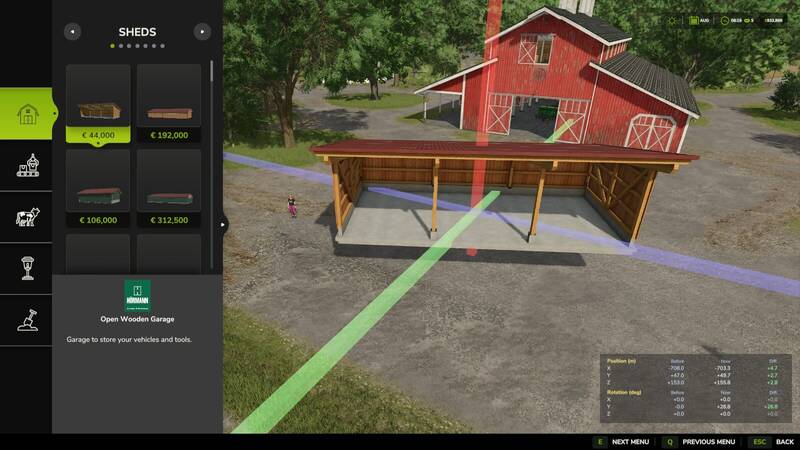
This mod allows you to reposition placed objects with ease. It supports movement along all three axes (X, Y, Z) and rotation around all three axes.
Usage:
- Open the construction menu (default: Shift+P)
- Select the placed object
- Choose the Move option
- Left-click on one of the 3 axes and move the mouse to move the object along the axis
- Right-click on one of the 3 axes and move the mouse to change the object's rotation around the axis
- Confirm the change by clicking on the placed object again or by pressing the Escape key; a final confirmation prompt will appear
- While editing, you can press Escape to discard or undo the change
Settings:
- Free Movement: When enabled, moving objects incurs no cost.
- Show Coordinate Overlay: Displays the starting and current coordinates (position and rotation) as an overlay when moving objects
Attention! This mod is a complete remake of the "Rearrange Placeables" mod by Helfer B (myself). The new mod is not compatible with the old version but replaces it. All functions have been revised and optimized for a better user experience. If you are using "FS25_RearrangePlaceables.zip", you must delete it before using the new "Move Placeables Advanced" version.
Changelog 2.0.0.0:
- Completely new code
- Various minor bug fixes
- Logic optimizations
- Pre-placed map objects can now be repositioned without errors
- Added setting for repositioning costs
- Added overlay showing before/after/diff for the object's alignment and rotation (can be disabled in settings)
Usage:
- Open the construction menu (default: Shift+P)
- Select the placed object
- Choose the Move option
- Left-click on one of the 3 axes and move the mouse to move the object along the axis
- Right-click on one of the 3 axes and move the mouse to change the object's rotation around the axis
- Confirm the change by clicking on the placed object again or by pressing the Escape key; a final confirmation prompt will appear
- While editing, you can press Escape to discard or undo the change
Settings:
- Free Movement: When enabled, moving objects incurs no cost.
- Show Coordinate Overlay: Displays the starting and current coordinates (position and rotation) as an overlay when moving objects
Attention! This mod is a complete remake of the "Rearrange Placeables" mod by Helfer B (myself). The new mod is not compatible with the old version but replaces it. All functions have been revised and optimized for a better user experience. If you are using "FS25_RearrangePlaceables.zip", you must delete it before using the new "Move Placeables Advanced" version.
Changelog 2.0.0.0:
- Completely new code
- Various minor bug fixes
- Logic optimizations
- Pre-placed map objects can now be repositioned without errors
- Added setting for repositioning costs
- Added overlay showing before/after/diff for the object's alignment and rotation (can be disabled in settings)
Comments
You must be logged in to comment.
No comments yet.