1 / 5
Virus checked
v1.0.0.0 latest
Free Mod
Vehicle Flags — Shop Configurator
–
Rating
0 Ratings
13
Downloads
465
Views
0
Thanks
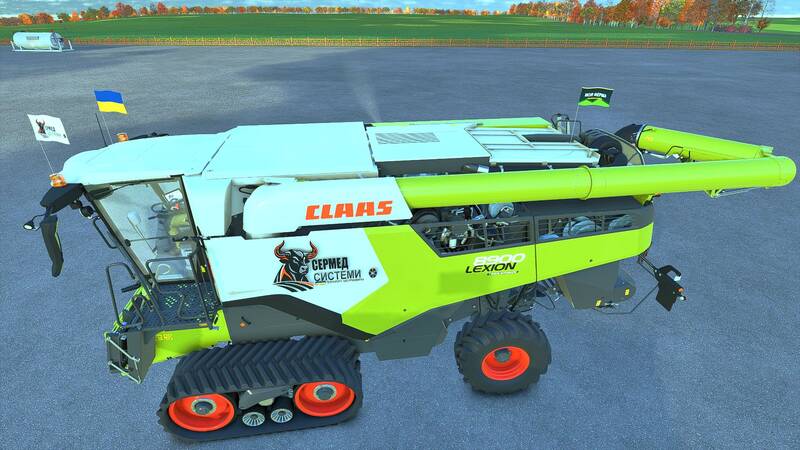
This mod adds three independent sets of animated flags that can be attached to any controllable vehicle.
Features:
- Choose a country flag, a custom image, or both flags.
- Separate settings for set 1, 2 and 3.
- Freely adjust position, rotation, flag size and pole height.
- Custom images can be used independently in each set.
- Configurable in the shop and workshop.
How to add a custom flag:
- Prepare an image with a 2:1 aspect ratio (recommended: 1024×512 or 512×256).
- Save it as PNG, JPG or DDS, e.g. my_farm.png.
- After launching the game for the first time with the mod, open the following folder: Documents → My Games → FarmingSimulator2025 → modSettings → FS25_VehicleFlags
- Place the images directly in the folder (no subfolders or archives).
- Open the flag settings in the shop or workshop and select the desired set.
- In the custom flag option, switch between images by their file name.
- Enable the custom flag or both flags, adjust the position and confirm.
Multiple images can be added. If newly added files do not show up, close and reopen the flag settings window.
Multiplayer: Identical images with identical names must be present in the specified folder on the server and on all players' PCs. Images are not transferred automatically.
Comments
You must be logged in to comment.
No comments yet.