1 / 6
Virus checked
v1.1 latest
Premium
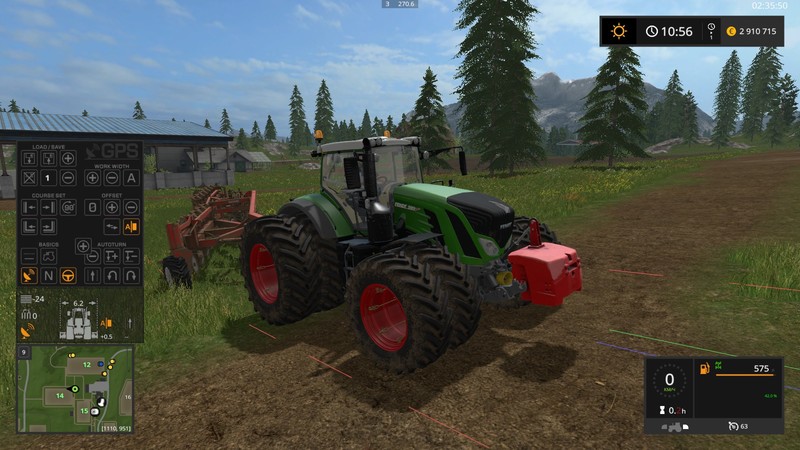
GPS HARD HUD MOD
★ 4.7
Rating
359 Ratings
20.0K
Downloads
100.6K
Views
88
Thanks
FS17 GPS HARD HUD MOD by Andrey Hard
Image files for mod GPS - https://www.modhoster.com/mods/gps--2
Updated all graphics mod files
Please do not change and do not use the files separately from this mod!
Instalation:
Open zzz_GPS.zip
Copy HUD folder from mod archive into zzz_GPS.zip
Comments40
You must be logged in to comment.
Hello, I seem to be having a bit of trouble trying to make Block1 not be transparent I have this hud installed and I have moved it from Left to Right I am on 1920x1080 Windowed Borderless. Thanks Screenshot... https://i.imgur.com/OpCEKYm.png
Re uploade bitte download Datei ist nicht mehr verfügbar
Hi Everyone, As it turns out I am terrible at FS17 mods. If possible may I ask if some one can send me GPS with Hard Hud already installed (I received errors for the sounds not working?) and with it on the right side for 1920x1080 display. If this breaks the rules can some assist me on how to combine the mods?
Looks much better! Nice work!
Thanks for this great new HUD, it just gives that new fs17 feeling to an allrdy great mod. I would like the hud on the right like in the picture that Bernelli posted. The block 1 image is no prob and sits perfectly alligned and connected. The block 2 image is a whole other story, it sits alligned on the x but i can't figure out how the move it on the y to make it connect to the block 1 texture. see linked image: http://i.imgur.com/aQVFIam.jpg Any tips/help on how to fix this are much appreciated.
You mus find optimal values for your monitor mode local yFields = move Block1 for Y local xFields = move Block1 and Block 2 together for X local yOff = move Block1 and Block 2 together for Y <HUDsize>1.3</HUDsize> - size HUD 0.75 - 75% 1.0 - 100% 1.3 - 130% etc.
My settings for 1980*1050 Windowed mode alignment to minimap in GPS_config.xml <HUDsize>1.096</HUDsize> in GPS.lua local yFields = 0.0088 local xFields = 0.0186; local yOff = 0.22;
My settings for 1980*1050 Windowed mode alignment to vehicle panel in GPS_config.xml <HUDsize>1.3</HUDsize> in GPS.lua local yFields = 0.011 local xFields = 0.8082; local yOff = 0.187;
For the setup monitor 1366*768 such: local yFields = 0.014 local xFields = 0.805 local yOff = 0.177
das gibt es doch schon von upsidedown und es ist genau das gleicht was selber machen und nicht stehlen . das ist moben aber nicht so.
Ach Martinchen, du hast nix verstanden. Das ist ein Hud für Upsidedowns GPS Mod da würde nix geklaut !
Thanks for the really good gps hud. It works fine. 5*
Thanks for beautiful GPS HUD! Andrey, can you fix alpha chanel on top side of Block1-2 textures. See screenshots http://s019.radikal.ru/i634/1611/90/83ebeaab2754.jpg http://s017.radikal.ru/i431/1611/e2/174ade02d574.jpg Best regards, Andrey.
Uploaded nev version whith this fix. Hope, this fix can help you.
I have this problem too, I don't know how to fix it. Thank you
Servus, kann mir mal jemand auf deutsch erklären wie ich es einbaeuen muss! danke im vorraus am besten pn
Den Hud Ordner im GPS Mod ZIP Ordner durch den aus diesem Download ersetzen. Fertig.