
XCOM IMAGE EXTRACTOR
V 0.4.0.1 mod for OpenXcom
0
Downloads today
388
Downloads total
0
Comment Count
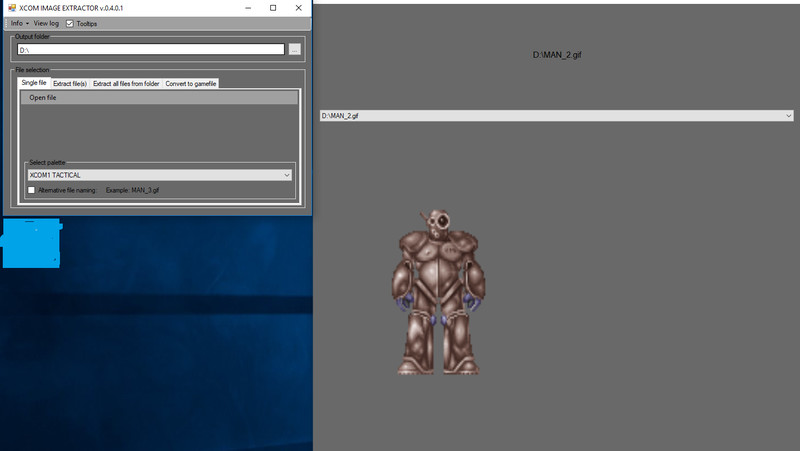
description
Description:
You can extract the images from XCOM1 and XCOM2 to .gif format and back to gamefiles.
Installation:
1) Extract the contains of the zip file
2) Instal JAVA from here: http://java.com/
3) Download Bomb Bloke's X-Com toolkit from here: http://www.strategycore.co.uk/files/bbs-toolkit/
4) Extract the contains of BB's toolkit to the XCOMextractor folder (or somewhere else)
5) Start XCOMextractor.exe
6) Choose an output folder
7) Choose the palette to used
8) Chose a file (*.pck); (*.bdy); (*.scr);(*.spk)
9) The extracted file (or folder - if its a pck file) will be stored in your selected output folder. No need to save manually.
10) The extracted image is previewed
CHANGELOG:
Version 0.1.0.0
- First release
Version 0.2.0.0
- Extract multiple files at once
- Extract complete folder at once
Version 0.3.0.0
- Bugfixes
- Support for '.dat'-files
- Added some tooltips
- Log of done operations
- Extracting a folder now includes subfolders
Version 0.4.0.0
- Extracted images can be displayed by selection
- Convert images back to gamefiles
Maybe coming soon...
- NOTHING
Forum
Credits
-
27 Jul 09:49Version 0.4.0.1
Version 0.1.0.0
First releaseVersion 0.2.0.0
Extract multiple files at once
Extract complete folder at onceVersion 0.3.0.0
Bugfixes
Support for '.dat'-files
Added some tooltips
Log of done operations
Extracting a folder now includes subfoldersVersion 0.4.0.0
Extracted images can be displayed by selection
Convert images back to gamefiles
Files

13.09 2018
V
0.4.0.1
27. 07 2020
388


![Cheat Soldier Stat [EU] Mod Thumbnail](https://images.modhoster.de/system/files/0095/3482/thumb/cheat-soldier-stat-eu.jpg)
0 Comments for XCOM IMAGE EXTRACTOR