EnhancedVehicle
What does EnhancedVehicle do?
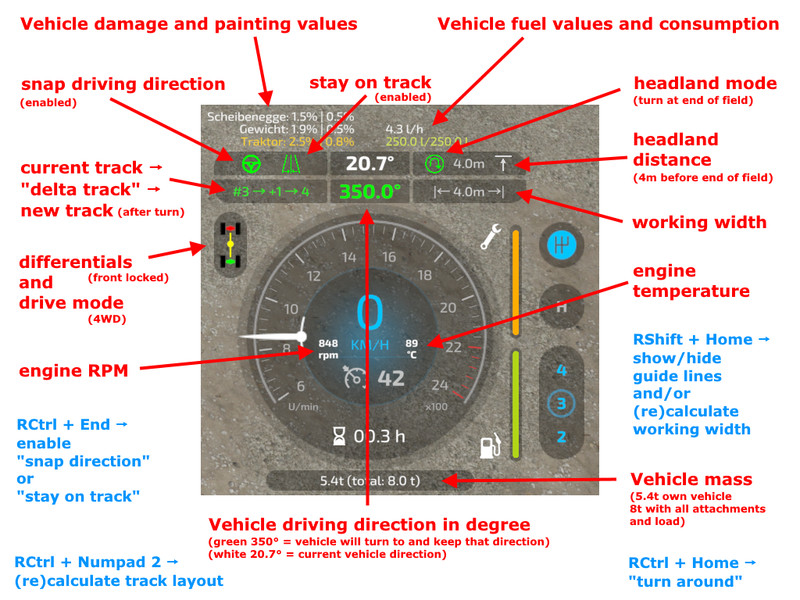
This mod adds a track assistant, a parking brake, differential locks, drive modes (all-wheel, RWD/FWD) and direct control of front/rear hydraulics and equipment to (motorized) vehicles. Additionally, the HUD gets a bit of an upgrade with a more detailed damage indicator, fuel tank level, fuel consumption, engine RPM and temperature, and weight/total weight.
Note
I recommend to open the configuration menu once after each new mod version via "Ctrl + Numpad /" and reset to default settings.
What's new in version 0.9.x?
First of all: Welcome to FS22. The mod functions from the FS19 version have all been taken over - except for the shuttle shift. That feature has been removed, as the game now supports this out of the box.
NEW feature: a track assistant ("GPS light") and a simple "hold direction" mode ("snap to direction").
How does the Track Assistant work?
- Drive to the field with your vehicle and an attachment and turn on the guide lines with RShift+Home.
- Position your vehicle parallel to the edge of the field.
- Turn on the track assistant with RCtrl + Numpad 2. A bunch of lines will appear representing the tracks.
- Above the speedometer you can see the current track number your vehicle is in, and next to it a number between -5 to +5. This number indicates how many tracks your vehicle will turn when you press the "turn" button. Example: You are in track #5 and press "turn" with a value of +1 -> your vehicle will enter track #6. Example 2: You are in track #10 and press "turn around" with a value of -3 -> your vehicle will sort into track #7.
- Press RCtrl + End to automatically keep the car in the current track. You don't need to steer now - just accelerate/brake or turn on cruise control.
- At the end of the field, the vehicle can turn around if you press RCtrl + Home. Note: The vehicle simply tries to reach the new track. It is not very intelligent about it. It does not turn in several moves or something like that. Just try it out and see how it works.
- When you steer, track keeping is immediately disabled. With RCtrl + End you turn it back on.
- If you changed the attachment or want to realign tracks -> RCtrl + Numpad 2.
- Headland: In the config menu you can turn on/off the headland mode, configure what should happen when headland is reached and set the distance to the end of the field
Keyboard mapping (can be remapped in game options) / full list on Github
- Ctrl + Numpad / - Open configuration menu. There you can turn on/off some functions and turn on/off the HUD elements.
- RCtrl + End - keep vehicle in current track or snap to current direction
- RCtrl + Home - Turn into next track or turn direction of travel by 180°
- RShift + Home - Change operating mode (snap to direction / snap to track / hold one second to turn assistant off)
- RStrg + Numpad 1 - (Re)calculate working width
- RStrg + Numpad 2 - (Re)calculate track layout
- RStrg + Numpad 3 - Cycle through different display modes for the guide lines
- RCtrl + Numpad 7 - Differential Lock Front Axle On/Off
- RCtrl + Numpad 8 - Differential Lock Rear Axle On/Off
- RCtrl + Numpad 9 - Change Drive Mode (All-Wheel Drive, RWD/FWD)
- Numpad Enter - Activate/release parking brake
- LAlt + 1 to 4 - hydraulics front/rear raise/lower, attached devices on/off
FAQ
Q: Where is the configuration file?
A: in [..]\Documents\My Games\FarmingSimulator2022\modSettings\FS22_EnhancedVehicle\FS22_EnhancedVehicle_v1.xml
Q: There seems to be something wrong with 2WD (=not all-wheel drive mode).
A: Quite possible. The mod is bound to the game engine. The sometimes does what it wants and taking into account all parameters such as tire size, friction, payload, etc., the vehicle can sometimes make strange jumps or the like. Currently, however, the mod should have this reasonably under control. The idea of the function is also rather all-wheel+differential locks active, so you can reasonably drive up the shit driving silo ;-).
Q: I don't see any engine temperature or fuel consumption!
A: Then you are most likely a participant in a multiplayer game and are not the host. Due to game engine limitations, the mod cannot determine and display the values.
Q: The damage for device xyz is always 0%
A: Then the device doesn't support a damage model and the mod can't display anything but 0%.
Additional Notes
The single, valid source for this mod is my Github repository: https://github.com/ZhooL/FS22_EnhancedVehicle
Comments11
You must be logged in to comment.
ich habe auf meinem server ein Problem 2023-09-10 07:59 Error: Running LUA method 'packetReceived'. CUsers/Megaport/Nextcloud/Gemeinschaft Land- Forst und Tier/Mods/FS22_EnhancedVehicle/FS22_EnhancedVehicle_Event.lua:47: attempt to index field 'vData' (a nil value)
Support wird dir hier in den Kommentaren keiner geben können, den dafür ist immer die vollständige log Datei notwendig. Aber generell ein Tipp: Modordner aufräumen. Das heißt: - Alle Mods die nicht benutzt werden löschen. - Alle Mods die beim starten schon Fehler und Warnungen haben nach Update suchen oder löschen. Hilft bei den meisten. Ansonsten meldest du deinen Fehler am besten direkt mit Log im GutHub. Da hast du die besten chancen. Link steht am ende der Modbeschreibung.
Danke Majo Super wie immer Daumen Hoch
Könnta da man noch ein kilometerstand Tages/gesammt mit einbaun ??
bei mir hatte ich den Fehler. 2022-01-03 18:42 X:\auto_builder\cache\svn\bc39c0c6d611016d38088dfeb30cadc8\src\base\scripting\lua\LuaScriptSystem.cpp (890): expectedType == Value::VoidType || expectedType == Value::ClassType 2022-01-03 18:42 LUA call stack: =X:/xxx/mods/FS22_EnhancedVehicle/FS22_EnhancedVehicle_Event.lua (80) : streamWriteFloat32 dataS/scripts/network/Connection.lua (88) : writeStream =X:/xxx/mods/FS22_EnhancedVehicle/FS22_EnhancedVehicle_Event.lua (110) : sendEvent =X:/xxx/mods/FS22_EnhancedVehicle/FS22_EnhancedVehicle.lua (1316) : sendEvent dataS/scripts/input/InputEvent.lua (100) : callback dataS/scripts/input/InputBinding.lua (3239) : notifyInput dataS/scripts/input/InputBinding.lua (2962) : updateInput dataS/scripts/main.lua (1281) : update 2022-01-03 18:42 Warning (script): 'streamWriteFloat32': Argument 1 has wrong type. Expected: Float. Actual: Nil 2022-01-03 18:42 X:\auto_builder\cache\svn\bc39c0c6d611016d38088dfeb30cadc8\src\base\scripting\lua\LuaScriptSystem.cpp (890): expectedType == Value::VoidType || expectedType == Value::ClassType 2022-01-03 18:42 LUA call stack: =X:/xxx/mods/FS22_EnhancedVehicle/FS22_EnhancedVehicle_Event.lua (80) : streamWriteFloat32 dataS/scripts/network/Connection.lua (88) : writeStream =X:/xxx/mods/FS22_EnhancedVehicle/FS22_EnhancedVehicle_Event.lua (110) : sendEvent =X:/xxx/mods/FS22_EnhancedVehicle/FS22_EnhancedVehicle.lua (1316) : sendEvent dataS/scripts/input/InputEvent.lua (100) : callback dataS/scripts/input/InputBinding.lua (3239) : notifyInput dataS/scripts/input/InputBinding.lua (2962) : updateInput dataS/scripts/main.lua (1281) : update sonst läuft der mod super, weiter so
Hast du etwas mehr Infos? War das direkt nach dem joinen auf einem dedi Server? War das beim Verlassen eines Fahrzeugs? Hast du gerade irgendeine Taste gedrückt?
Bester LS 22 Mod weiter so
Hi zusammen, der Mod ist echt suiper aber leider bekomme ich keine Spurbreite und die Arbeitsbreite nicht angezeigt. Obwohl ich alles auf an habe
Sorry hab versucht PN zu schreiben aber das geht irgendwie nicht. Daher so... wir zocken auf einem eigenen MP-Server. Grundsätzlch haben wir keine Fehler bemerkt jedoch wird die Log datei mit dieser Nachricht zugespamt. 2021-12-19 14:12 Error: Running LUA method 'draw'. C:/Users/????/Documents/My Games/FarmingSimulator2022/mods/FS22_EnhancedVehicle/FS22_EnhancedVehicle.lua:2338: attempt to perform arithmetic on local 'num' (a nil value) Farming Simulator 22 (Steam) Version: 1.2.0.0 b14654
Vielen dank für die tolle Mod im LS 22 :) Hat mir schon richtig gefehlt. :)