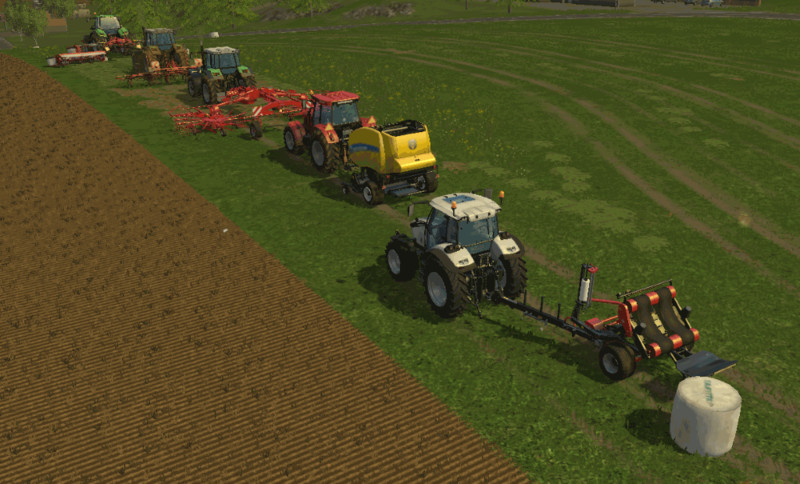
Follow Me Mod
Follow Me (v2.1.0)
Remember to check the support topic for any additional information regarding this mod
Changelog
v2.1.0
- Added BaleWrapper unloading.
- Ability to pause a follower (wait/resume).
- Stop engine when follower is stopped (other mods override this).
- If baler is 95% full, then slower driving.
- Hungarian translations by pokers.
- Polish translations updated by Ziuta.
- French translations updated by bbj89.
- Russian translations updated by Gonimy_Vetrom.
v2.0.9
- Italian translations by DD ModPassion.
Mod description
Have you ever wanted to make a transport convoy, or just be able to; cut grass - dry it - rake it - bale it - wrap it - pick it up, with multiple tractors all in one go?
With the 'Follow Me' mod, a vehicle can be told to follow after another vehicle.
How to use it
Before telling about the controls, here's a list of known problems that may occur when you use it:
- The speed of followers may not always be 100% accurate as it could be, with regards to how fast/slow they should drive when following the "trail".
- Some vehicles may start to zig-zag, in the attempt at following the "trail", due to trying to touch every "trail crumb". This is most obvious when reaching a turn at high speeds, and trying to "get back on track".
- Turning on beaconlights, when having set up a circular convoy - i.e. vehicle-A follows vehicle-B follows vehicle-C follows vehicle-A - will make the beaconlights repeatedly turn on and off.
Controls
The action-keys, which can be changed in Options - Controls, are defined in two sets:
Myself - For the vehicle the player is driving:
RIGHT CTRL + F = Start/stop following the vehicle that is in front (if possible).
RIGHT CTRL + H = Pause/resume following the vehicle that is in front.
RIGHT CTRL + A/D = Adjust left/right offset when following, in steps of 0.5.
Press-and-hold RIGHT CTRL + A/D = Invert the offset.
RIGHT CTRL + W/S = Decrease/increase following distance, in steps of 5.
Press-and-hold RIGHT CTRL + W/S to repeat decrease/increase in steps of 1.
Behind - To control the vehicle that is following behind me (if any):
RIGHT SHIFT + F = Stop the follower.
RIGHT SHIFT + H = Pause/resume the follower.
RIGHT SHIFT + A/D = Adjust the follower's left/right offset, in steps of 0.5.
Press-and-hold RIGHT SHIFT + A/D = Invert the follower's offset.
RIGHT SHIFT + W/S = Decrease/increase the follower's distance to me, in steps of 5.
Press-and-hold RIGHT SHIFT + W/S to repeat decrease/increase in steps of 1.
Note: Each set of action-keys must use the same modifier-key!
Switching it on/off
Do please note that, when loading a new map or savegame, the vehicles have not yet placed enough "trail crumbs" for other vehicles to follow. So do remember to drive the leading vehicle some distance, before setting up the follower vehicle.
To follow some vehicle, point your own vehicle towards it and press the start action (RIGHT CTRL + F).
If no "trail crumbs" can be found, or the vehicle already is followed by another, a warning will appear and you will have to either move a little bit further towards/back, or change to follow another vehicle.
It is possible to "pause" driving, and then later "resume" following the leader's trail, using the wait/resume action (RIGHT CTRL + H).
To stop following, press the same action again (RIGHT CTRL + F).
Distance and offset
The follow distance can be set using RIGHT CTRL + W/S, in increments of approximate 5 meters. Positive values are "keep back" distance (up to +250), and negative values are "in front" (up to -50).
Do please note that vehicles that have no traffic-collision-triggerboxes or not configured correctly, will not be able to detect when/if they collide into the leading vehicle or some other vehicle - so you better set the distance further back.
Left/right offset is set using RIGHT CTRL + A/D, in increments of approximate 0.5 meter.
Equipment/tools handling
If a follower has a turned on round-baler or a bale-wrapper, it will now automatically unload the bale. Please note; primarily only the vanilla Baler/BaleWrapper scripts are supported, so some mod balers may not work as intended.
Problems or bugs?
If you encounter problems or bugs using this mod, please use the support-thread at http://fs-uk.com - Find the mod (and correct version) in the mods section, in category 'Other - Game Scripts'.
Known bugs/problems:
- Followers are not able to detect traffic-vehicles, and will therefore collide with them.
- Followers speed is not always 100% accurate.
- Too high speed into a turn, or having a slow steering, will make the follower go zig-zag in an attempt at "getting back on track".
- Follower-vehicles that has no build in traffic-collision-box can (obviously) not detect if they are about to collide with something in front.
Credits
Polish translations by: Ziuta & spinah
Hungarian translations by: pokers
Italian translations by: DD ModPassion
French translations by: bbj89
Russian translations by: Gonimy_Vetrom
Original addSpecialization: Xentro
Some German translations by: DrUptown
Comments23
You must be logged in to comment.
Bester Mod kannst du den auch für LS19 machen ?
Best Mod Ever! Commes this for LS19?
can u convert this wow mod for fs17? pls
Hallo Notfall brauch den dringend für LS17 Bitte!!!!!
Hallo, gibt es den dann auch für LS17ß
Hello community you will make this super mod for LS17 ? Best wishes
bei mir geht der mod nicht ich weiß nicht wie man das menü öffnet kann mir jemand helfen
STRG rechts und F gleichzeitig drücken Rechts / Links versetzt A und D Abstand W und S einstellen Wird auch im Video von Exit LP erklärt
Super Mod für den Bundeswehr oder Feuerwehr Bereich. Zwar gibt es noch ein Paar probleme bei höreren geschwindigkeiten aber ich kann es Selbst garnicht. Also Hut ab :)
wie kann ich den Traktor dazu bringen mir zu folgen und überhaupt wie ich das sanbekomme
the original follow me mod was one of the first mods I got,a few glitches where things veer off now and again.but mod keeps getting better and glitches less. great mod.thoroughly recommend.
Also Dieser mod genial für einzelkämpfer tolle leistung an den >Modder klappt super und mann kann alles fast alleine machen mit mehreren maschinen
Wie bekomme ich den zum laufen? Wird zwar unter Einstellungen angezeigt aber funktioniert in Game nicht. Kann mir bitte jemand helfen?
Funktioniert das auch mit zum beispiel feuerwehrfahrzeugen
ja tut es mach auch scho nlange
Bei mir funktioniert es nicht. :/ Ich habe es in den Mod ordner gezogen, das Spiel gestartet.Kann wer helfen?:c
Hast du es schon entpackt/ extrahiert? Wenn nein dann probiere es mal.
geht das auch wenn man häckselt?
Ja. Es geht mit allen Fahrzeugen bei allen Tätigkeiten.
Mega lustig wie der Trecker hinter her eiert :) aber super Mod total hilfsreich