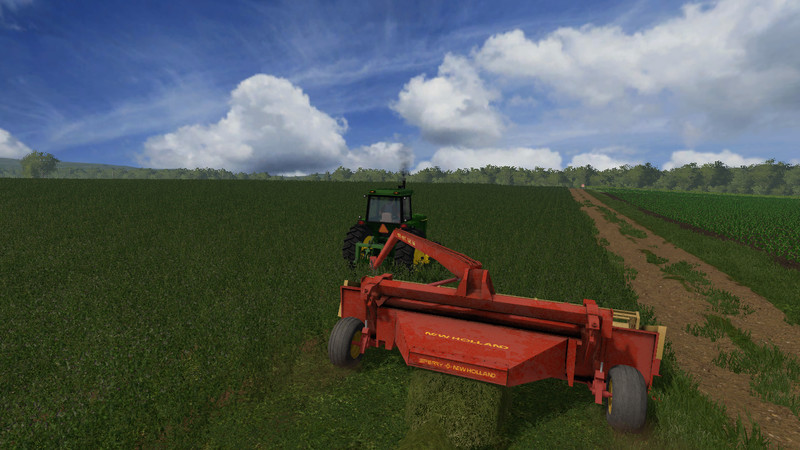
New Holland 116 Hydroswing Haybine
Here is my FarmSim Steve's latest mod of a New Holland 116 Hydroswing Haybine. We used two 116 Hydroswings a lot on our farm growing up so I was highly motivated to have it look and feel just like it did growing up. I can honestly say I feel I hit the nostalgia just the way I intended and so I wanted to share this mod with the community.
For extra-wide cutting in your largest fields, get the versatile performance of a 116 Series Haybine. The 116 mower offers a wide 16' cutting width without sacrificing in-field maneuverability or performance. With the Hydraswing arm you can rest assured your getting the most flexibility in the field.
Brand: Sperry New Holland
Price: $12,500
PTO: 540
NeedToPower: 50
Cutting Width: 16'
Animations
HydroSwing Left & Right
SwingRam
Up/Down
Reel & Auger
Rear Effect Node
Gets Dirty
Comments5
You must be logged in to comment.
i have a problem with the tires they arent showing up could someone help me please
V1.1 wird im Spiel im Shop nicht angezeigt, also nicht kaufbar. V1 ist kaufbar aber ohne Funktion und Räder.
Bitte benennen Sie die Datei in "FS17_NH_116_Haybine_v1_1.zip" um, damit sie in FS17 angezeigt wird
Version1.1 has an issue with an invalid character in the zip file name. Please rename the file to "FS17_NH_116_Haybine_v1_1.zip" in order for it to show up in FS17. Also, "Left Ctrl V" to raise and lower the swather.
these are the lines that needed fixed. <File fileId="12" filename="textures/Wheel Diffuse.dds" relativePath="true"/> <File fileId="13" filename="textures/Wheel_Normal.dds" relativePath="true"/> <File fileId="14" filename="textures/Spec.dds" relativePath="true"/> <File fileId="15" filename="textures/vehicleShader.xml" relativePath="true"/>
There where a few typos in the i3d related to the wheels and shader. after fixing those the wheels show up. is there a way to lower the mower? the normal commands to raise and lower the mower do not work.
Aklein. I did some more sleuthing as a few others have had issues with the raise lower. Check your raise/lower settings. Go to FS17 Main menu->options->controls then scroll through the actions and look for "Lower/raise all tools" ... I use a gamepad so I can stay away from the computer. My keyboard binding setting for that is "Left Ctrl V" in my options so I tried it and it works from the keyboard so should work. There is a slight delay between raise and lowers for the hydraulic animation.?
Thanks Aklein. Those fields were indeed pointing to the wrong location. Thanks for catching that. I have pushed out a new version 1.1 that includes the fix for anyone else who is getting started with the mod. It should raise and lower the same as any other implements and includes a lowerAnimation.