VehicleExplorer
VehicleExplorer for FS19 aka VeEx19
This is a revamp of the good old VehicleSort from FS17
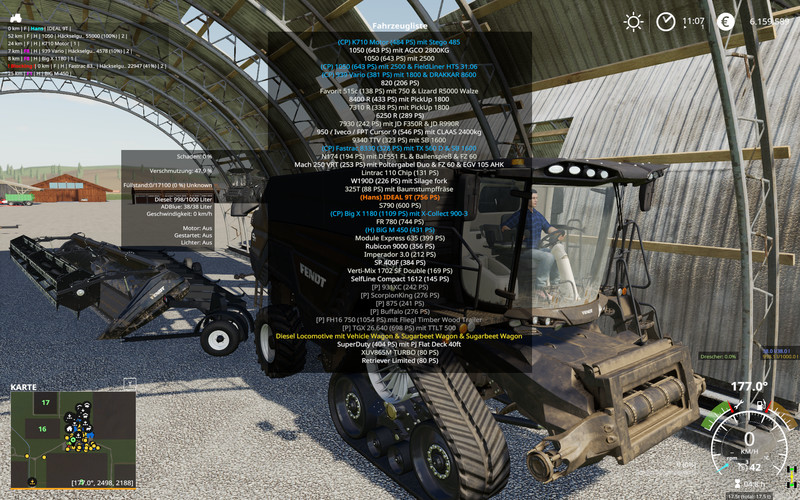
For beginners: VehicleExplorer helps you organize your vehicles, by showing you a list which can be organized, well, sorted by you. Besides that it has a couple of additional functionality. See below.
Feedback, this readme and additional information incl. source code can be find at: https://github.com/sperrgebiet/FS19_VehicleExplorer
Please download the latest version directly from GitHub Latest version
Features
- List of all steerable vehicles (Specialization: Enterable)
- Set a customer order for your vehicles
- Your order is saved in the default vehicles.xml, so no additional clutter
- Enter your vehicles directly with a click of a (mouse) button
- This is meant literally, see known issues ;)
- Park your vehicles, so that a switch of vehicles via Tab ignores them
- Repair vehicles and its implements
- Let your vehicle and implements get cleaned on a repair from your friendly VeEx staff ;)
- Displaying a store image next to the list
- Info box with additional informations
- Motor on/off, turned on/off (for e.g. harvester) and light status is saved and restored
- Different colors in the list if a vehicle is selected, or currently used by a helper/Courseplay
- Config Menu
- Config is saved per savegame within modsSettings/VehicleExplorer/savegameX
- Show/hide trains in the list
- Show/hide station cranes in the list (No idea if that actually works, would need a map with a crane to test)
- Show/hide steerable implements/trailers (e.g. forwarder trailer with crane)
- Show/hide brand names in the list
- Show/hide your own name when you enter a vehicle
- Show/hide horse power in the list
- Show/hide fill levels in the list
- Show/hide implements in the list
- Show/hide store images
- Show/hide infobox
- Move infobox up/down
- Show/hide a background for the infobox/store image
- Change text size
- Change text alignment
- Change list background transparency
- Enable/disable saving of the additional vehicle status (motor, turnedOn, lights)
- Show/hide keybindings in the game F1 help menu (needs a game restart to take affect)
- Clean vehicle & implements on a repair
- Tardis integration
- With Tardis (https://github.com/sperrgebiet/FS19_Tardis) you can teleport yourself AND your vehicles to any position on the map
- With VehicleExplorer & Tardis you can select a vehicle on the list, and teleport that to any location without entering it. You can also configure if you want to enter the vehicle after teleportation or just drop the vehicle to another location
- With Tardis Map Hotspots you can again, select a vehicle and quickly teleport that to one of those hotspots
Known issues
- Although you can change all the keyboard bindings, the mouse actions are hardcoded for now
- Left mouse click: Enter vehicle
- Right mouse click: Select vehicle (to e.g. move it)
- Right mouse click: Change value in the config menu
- Mouse wheel: Selection up/down in list
- The actual 'tab order' of vehicles is not changed -> Workaround available
- Metric measuring units are used
- Max of three columns. If you've more vehicles (which would be insane anyways ;) , just disable the display of brand name etc
- A wrong value for horse power is displayed for trains
- Sometimes selling or resetting a vehicle is causing a flickering of the vehicle list. I've already an idea why, just have to look more into it. As a workaround you just have to move any vehicle a position up or down, then a reshuffle is triggered and the list is rendered properly again.
- If a train is parked, although this state gets saved, on loading a savegame it's not restored. So the train is tabbable.
Incompatible Mods
- SpeedControl
- Actually both work fine side by side. There is just a keybinding overlap. So you've to set new keybindings through the game menu for Key 1, Key 2, Key NumPad Plus, Key NumPad Minus
- Changed the default keybinding. So there is no overlap anymore.
Default Keybinding
| Key Combi | Action |
|---|---|
| LAlt + v | Show/hide vehicle list |
| LAlt + KeyPad Minus | Show/hide config menu |
| KeyPad Enter | Enter vehicle |
| LAlt + p | Toggle parking |
| LAlt + KeyPad 5 | Select item (for moving the vehicle) or to change values in the config |
| LAlt + KeyPad 8 | Move up in the list/config |
| LAlt + KeyPad 2 | Move down in the list/config |
| LAlt + 1 | Move up fast in the list/config |
| LAlt + 2 | Move down fast in the list/config |
| LAlt + R | Repair vehicle incl. implements |
| Tab | Next vehicle; VeEx own switch vehicle implementation (necessary to tab through vehicles in your own order) |
| Shift + Tab | Previous vehicle; VeEx own switch vehicle implementation (necessary to tab through vehicles in your own order) |
| Mouse Left | Enter vehicle |
| Mouse Right | Select item/change values in config |
| Mouse Wheel | List up/down |
_ If you want to use the 'sorted tabbing', make sure you drop the default key binding in the game menu. I didn't find a way to overwrite the default vehicle switching, and I think it's better to let you, the user, this choice anyways. _
Meaning of colors used
| Color | Meaning |
|---|---|
| White | Standard |
| Green | Current player is controlling vehicle |
| Orange | Vehicle selected |
| Red | Vehicle locked (necessary to move it up/down in the list) |
| Grey | Vehicle is parked |
| Blue | Vehicle is controlled by AI (Helper or Courseplay) |
| Light Pink | Vehicle is controlled by FollowMe (not yet available) |
| Yellow | Engine is running |
Note that the current version does NOT support multiplayer!
There were reports that VehicleExplorer does work in MP if you simply change the moddesc.xml. Although I assume not everything works then. Anyways, I decided to work on a MP version. Just have no idea yet till when it will be available.
Credits
Primarily to Dschonny & Slivicon. At least those are the names which were mentioned in the FS17 VehicleSort I used as a foundation. But the majority of code has changed anyways. Also Kudos to the guys and gals from CoursePlay, VehicleInspector, VehicleFruitHud, EnhancedVehicle and many more for some inspiration and ideas. Additionally Ifko[nator] for the RegisterSpecialization script.
Latest Version
0.9.1.0 - I consider it as Beta. I tested it quite a lot myself, but hope for some helpful feedback from the community.
Comments73
You must be logged in to comment.
Hallo, eine Frage: Gibts diesen Mod auch mal für den FS25 ? Das ist ein genialer Mod, vor allem zum Parkieren der Fahrzeuge
Vielen Dank. Jetzt kann ich meinen Fuhrpark endlich mal sortieren.
Toller Mod. Meine Maustasten machen zwar nicht immer das, was sie wollen, mal wird mit der Linken zum Fahrzeug gesprungen, beim nächsten Fahrzeug wird es nur ausgewählt und ich muss zwei Mal Links klicken um wieder ein neues Fahrzeug auswählen zu können. Aber damit kann ich leben.
Hey, die Mod ist super nützlich finde ich. Wird noch an ner MP Funktionalität gearbeitet? Eigtl. geht alles, man müsste nur die Fahrzeuge der andren Farmen beim laden rausfiltern. Kenn mich da leider zuwenig mit LUA aus.
ich kann keine fahrzeuge mehr wechseln auf dem gamepad nu was mache ich falsch ich habe schon überall belegung geguggt..überall steht das die tasten belegt sind so wie sein soll
Servus, gibt es denn mitlerweile Fortschritte oder Erfahrungen mit dem Mod aus Servern und Multigamespielen?
Leider bekomme ich diesen Mod nicht auf den Dedi Sever hochgeladen. Die Meldung lautet immer das die Datei beschädigt ist. Finde ich sehr schade.
versuch mal die version 0.9.3.9, von hier: https://github.com/sperrgebiet/FS19_VehicleExplorer lg andreas
der status, der Geparkten Fahrzeuge wird auf dem Dediserver nicht Gespeichert. wird das noch behoben ??.
Bitte Bau ein,dass man die sachen im Hilfe Menu deaktivieren kann.... Sonst Top
Error: Running LUA method 'update'. 2019-05-08 00:51 C:/Users/Documents/My Games/FarmingSimulator2019/mods/FS19_VehicleExplorer/VehicleSort.lua:1780: attempt to index a nil value kann mir einer mal sagen was das ist und was für ein fehler ist ist nicht böse gemeind dankeschön vorraus ich bin kein modder aber top der mod weiter machen und dankeschön vorraus
Gibt schon neuere Versionen auf Github. Aktuell gerade 0.9.3.5 Lg Andreas
leider nicht Dediservertauglich, ansonsten ein guter mod. würde er Fehlerfrei und auf den Dediservern Laufen wehre er Top
Hallo sperrgebiet, ich würde mich freuen, wenn der Fehler mit dem switchen beseitigt wird. Auf github wurde der Fehler mehrmals beschrieben, von dir kommt keine Antwort. Man hat den Eindruck, du machst nichts mehr an dem Script.
Hallo anthu Ich habe den manuellen Motorstrat auf aus
hallo tigrecita ich hab jetzt den (vermutlichen) Auslöser gefunden, und zwar, wenn "Fahrzeugstatus speichern" auf "aus" ist, fährt kein Zug schalte ich diesen jedoch auf "An" fährt der Zug ganz normal über die map. lg andreas
Hallo sperrgebiet, in der 0.9.3.1 habe ich in der log.txt folgendes stehen. Error: Running LUA method 'mouseEvent'. D:/Dokumente/My Games/FarmingSimulator2019/mods/FS19_VehicleExplorer/VehicleSort.lua:397: attempt to call method 'getIsControlled' (a nil value) Und auch zum teil auch sachen wie unten bei Ralfons